
8.2 KiB
🎯 Quantumult - Classic Minimalist Proxy Tool

🌟 Quantumult is the classic version of Quantumult X, beloved by users for its simple and stable design philosophy and reliable basic functionality, making it an ideal choice for entry-level users.
✨ Product Features
🎯 Core Advantages
- 🎨 Clean Interface: Minimalist design with intuitive operation
- 🛡️ Stable & Reliable: Time-tested stable kernel
- 💰 Affordable Price: More economical compared to Quantumult X
- ⚡ Lightweight: Low resource consumption, smooth operation
- 🔧 Easy to Use: Simple functions, suitable for beginners
🔗 Protocol Support
| Protocol Type | Support Status | Use Case |
|---|---|---|
| 🔒 Shadowsocks (SS) | ✅ | Classic encryption protocol |
| 🔓 ShadowsocksR (SSR) | ✅ | Enhanced protocol |
| 🌟 VMess (V2Ray) | ✅ | Modern protocol |
| 🛡️ Trojan | ✅ | TLS camouflaged traffic |
| 🧦 SOCKS5 | ✅ | Universal proxy protocol |
🛠️ Feature Highlights
- 📊 Basic Traffic Splitting: Support for simple rule-based routing
- 🎛️ Policy Groups: Basic policy group configuration
- 📈 Traffic Statistics: Real-time network usage monitoring
- 🔄 Auto Switching: Automatic switching when nodes fail
- 🎯 Latency Testing: Check server response times
📱 System Requirements
- Minimum Version: iOS 9.0 or higher
- Recommended Version: iOS 12.0 and above
- Compatible Devices: iPhone / iPad / iPod Touch
- Storage Requirement: About 30MB available space
- Memory Requirement: Supports 1GB RAM devices
📥 Download & Purchase
🏪 App Store Information
⚠️ Important Reminder
- Not available in China mainland App Store
- Requires non-China mainland Apple ID
- Recommend using US, Hong Kong, or other region accounts
💰 Price Reference
| Region | Price | Notes |
|---|---|---|
| 🇺🇸 US | $4.99 | Recommended purchase |
| 🇭🇰 Hong Kong | HK$38 | Convenient payment |
| 🇯🇵 Japan | ¥610 | Exchange rate advantage |
🆚 Version Comparison
| Feature Comparison | Quantumult | Quantumult X |
|---|---|---|
| 🏷️ Price | $4.99 | $7.99 |
| 🎨 Interface Complexity | ⭐⭐ | ⭐⭐⭐⭐⭐ |
| 🔧 Feature Richness | ⭐⭐⭐ | ⭐⭐⭐⭐⭐ |
| 📚 Learning Curve | ⭐ | ⭐⭐⭐⭐ |
| 🎯 Target Users | Beginners | Advanced users |
| 📜 Script Support | ❌ | ✅ |
| 🛠️ Custom Rules | Basic | Advanced |
⚠️ Usage Notes
💰 Paid Software Notice
⚠️ Important Notice
- Quantumult is paid software that requires you to purchase it yourself
- Please purchase through legitimate channels to support continuous development
- Price is more affordable compared to Quantumult X, suitable for budget-conscious users
📚 Technical Support Scope
📋 Service Description
- ✅ Basic Configuration: Subscription import and connection tutorials provided
- ✅ Common Issues: Basic usage questions answered
- ❌ Advanced Rules: Complex rule configuration not provided
- ❌ Script Functions: This version doesn't support script functionality
- ❌ Advanced Tutorials: Users need to learn and research independently
🚀 Usage Tutorial
📋 Prerequisites
Before starting configuration, please ensure:
- ✅ Quantumult purchased and installed from App Store
- ✅ Valid server subscription link available
- ✅ Device network connection is normal
🛠️ Configuration Steps
🔗 Subscription Import Process
Step 1: Launch Application
Open Quantumult and enter the main interface:

💡 First launch will request VPN permission, please select "Allow"
Step 2: Enter Settings
Click the "Settings" tab at the bottom:
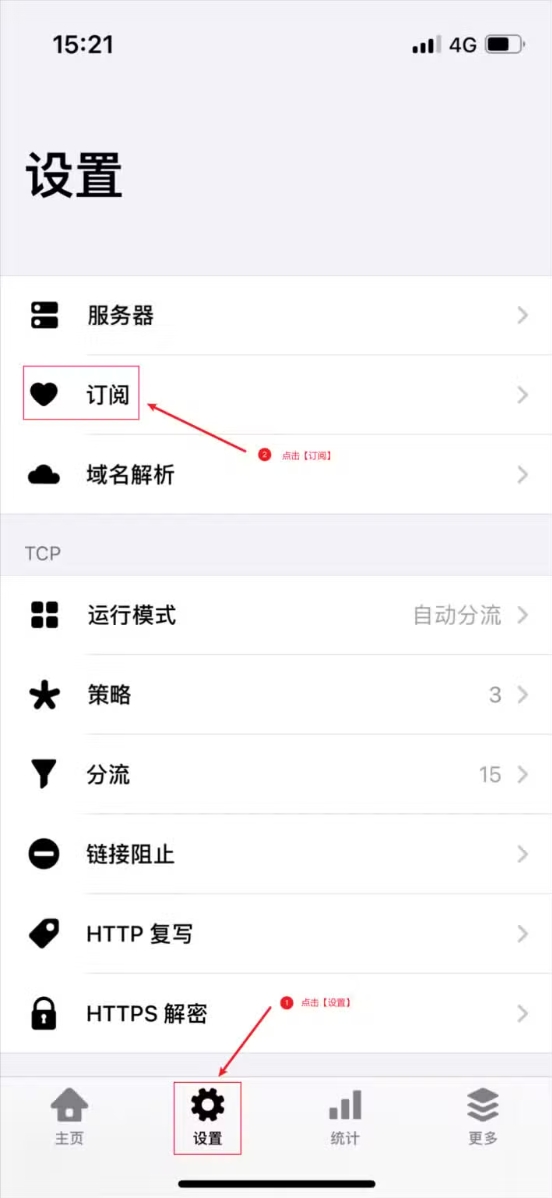
Step 3: Add Subscription
Find "Servers" option and click to enter:
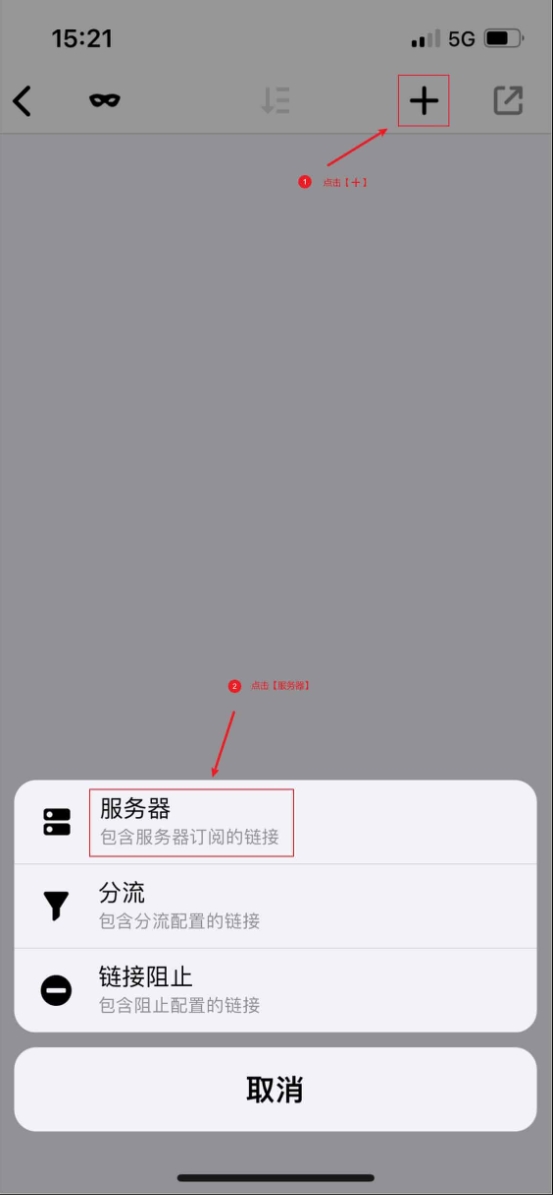
Step 4: Import Link
Click the "+" icon in the top right corner, select "Server Subscription":
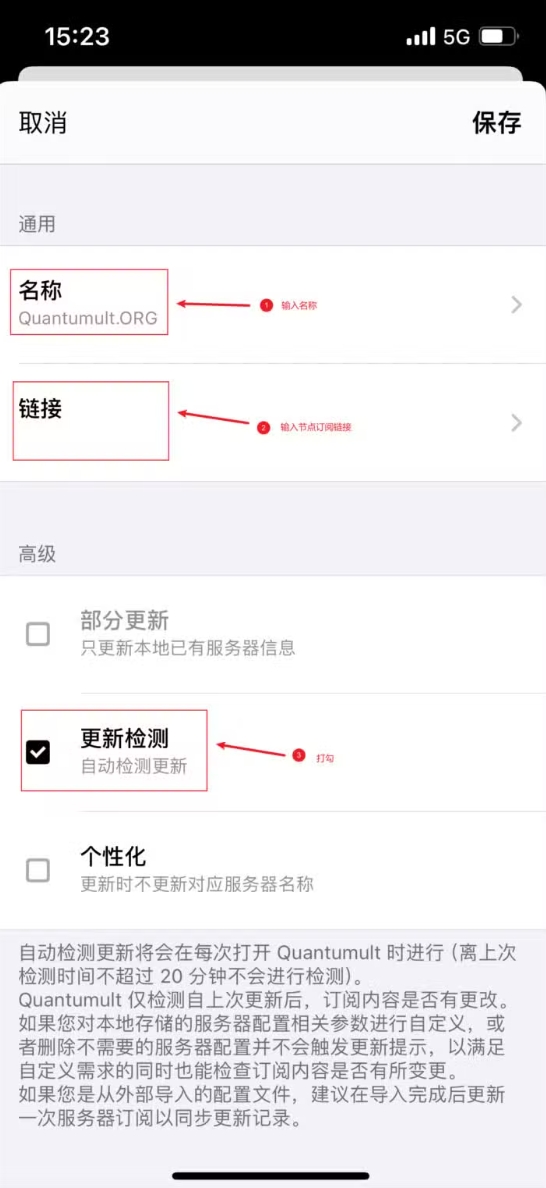
Step 5: Paste Link
Enter subscription link and click "Save":
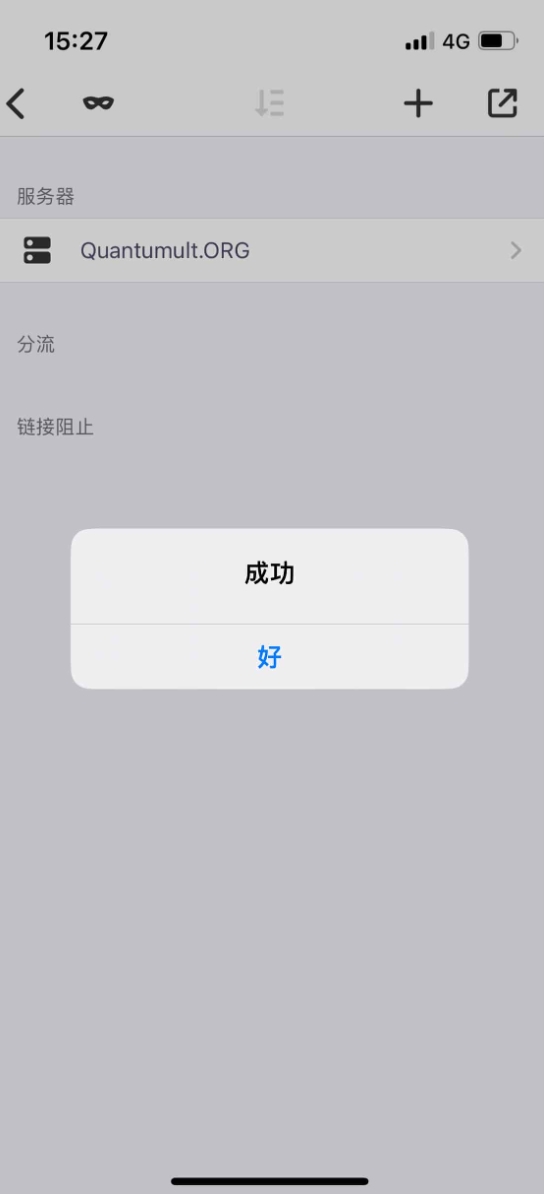
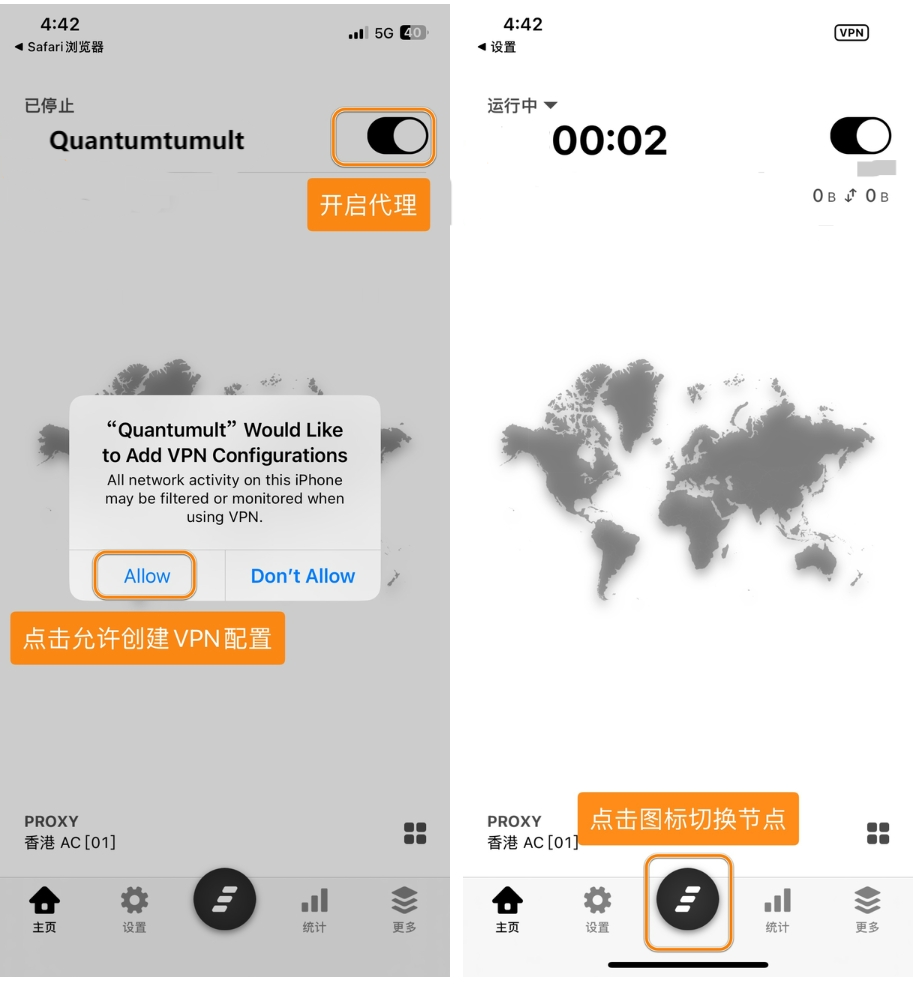
Step 6: Start Connection
Return to main interface, select node and enable connection:
🎛️ Basic Settings
⚙️ Proxy Modes
- Global Mode: All traffic through proxy
- Rule Mode: Smart traffic splitting based on rules
- Direct Mode: All traffic direct connection
📊 Node Management
- Manual Selection: User manually selects server
- Auto Selection: Automatically select optimal node based on latency
- Load Balancing: Traffic distributed across multiple nodes
🔄 Update Management
- Manual Update: Manually refresh subscription for latest nodes
- Auto Update: Set scheduled automatic subscription updates
- Update Frequency: Recommend updating once daily
❓ Frequently Asked Questions
🔧 Connection Issues
Q: Unable to connect to server?
A: Please check:
- Subscription link is correct and valid
- Selected node is available
- Local network connection is normal
- VPN permission has been granted
Q: Connection speed is slow?
A: Optimization suggestions:
- Try switching to other server nodes
- Select servers with lower latency
- Check local network quality
- Avoid peak network usage times
📱 Application Issues
Q: Application crashes frequently?
A: Solutions:
- Restart device
- Reinstall application
- Check iOS version compatibility
- Clear device storage space
Q: Subscription import failed?
A: Troubleshooting steps:
- Confirm subscription link format is correct
- Check network connection status
- Try manually adding single node
- Contact service provider for confirmation
🔗 Related Resources
📚 Learning Materials
🛠️ Useful Tools
🆙 Upgrade Recommendations
If you need more powerful features, consider upgrading to:
- 🚀 Quantumult X: Most comprehensive features, supports scripts
- 🌊 Surge: Enterprise-level stability
- 🚀 Shadowrocket: Lightweight with excellent value
💡 Usage Tips
⚡ Performance Optimization
- Choose Nodes Wisely: Select servers with low latency and good stability
- Update Subscriptions Regularly: Keep node list current
- Avoid Frequent Switching: Use single node stably, avoid frequent switching
🛡️ Security Recommendations
- Genuine Purchase: Buy through official channels to ensure software security
- Subscription Security: Only use trusted service providers
- Privacy Protection: Pay attention to personal information and usage habit protection
🎯 Summary & Evaluation
✅ Advantages
- 💰 Affordable Price: $3 cheaper than Quantumult X
- 🎨 Clean Interface: Simple operation, easy to get started
- 🛡️ Stable & Reliable: Basic functions stable with few issues
- ⚡ Good Performance: Low resource consumption, smooth operation
❌ Limitations
- 🔧 Limited Features: Fewer features compared to Quantumult X
- 📜 No Script Support: Doesn't support JavaScript scripts
- 🎛️ Limited Customization: Fewer advanced configuration options
- 🔄 Slower Updates: New feature updates not as frequent as Quantumult X
🎯 Target Users
- 🆕 Beginners: First-time users of iOS proxy tools
- 💰 Budget-Conscious: Want to save on purchase costs
- 🎨 Simplicity Lovers: Prefer simple and intuitive interfaces
- 🛡️ Stability Priority: Value stability over feature richness
📅 Last Updated: July 10, 2025 | 🎯 Applicable Version: Quantumult 2.2.1