
6.5 KiB
6.5 KiB
🚀 Shadowrocket - Classic Little Rocket

🎯 Shadowrocket (Little Rocket) is the most popular lightweight proxy tool on iOS platform, beloved by users for its clean interface, stable performance, and affordable price.
✨ Product Highlights
🎨 Core Features
- 🎭 Clean Interface: Minimalist design, easy to use
- ⚡ Stable Performance: Low resource consumption, smooth operation
- 💰 Affordable Price: Only $2.99, excellent value for money
- 🔧 Practical Functions: Complete basic features for daily needs
- 🛡️ Battle-tested: Years of market validation, excellent reputation
🔧 Protocol Support
| Protocol Type | Support Status | Use Case |
|---|---|---|
| 🔒 Shadowsocks (SS) | ✅ | Classic protocol, strong compatibility |
| 🔓 ShadowsocksR (SSR) | ✅ | Enhanced version, anti-detection |
| 🌟 V2Ray (VMess) | ✅ | Modern protocol, feature-rich |
| ⚡ Xray (VLESS) | ✅ | High performance, low latency |
| 🛡️ Trojan | ✅ | HTTPS traffic camouflage |
| 🌐 HTTP/HTTPS | ✅ | Traditional proxy protocols |
| 🧦 SOCKS5 | ✅ | Universal proxy standard |
📱 System Compatibility
- Minimum Requirement: iOS 9.0 or higher
- Recommended Version: iOS 12.0 and above
- Compatible Devices: iPhone / iPad / iPod Touch
- Storage Requirement: About 50MB available space
📥 Download & Installation
🏪 Official Channels
⚠️ Important Reminder
- Not available in China mainland App Store
- Requires non-China mainland Apple ID
- Recommend US, Hong Kong, or other region accounts
📍 Price Information
| Region | Price | Notes |
|---|---|---|
| 🇺🇸 US | $2.99 | Recommended, stable |
| 🇭🇰 Hong Kong | HK$23 | Convenient payment |
| 🇯🇵 Japan | ¥370 | Exchange rate advantage |
🔑 Apple ID Acquisition
Method 1: Self Registration
- Visit appleid.apple.com
- Select non-China mainland region
- Complete email verification and information filling
Method 2: Purchase Ready Account
- Choose reputable merchants
- Pay attention to account security and after-sales service
- Recommend changing password after purchase
🚀 Configuration Tutorial
📋 Prerequisites
Before starting configuration, please ensure:
- ✅ Shadowrocket is successfully installed
- ✅ You have valid server information
- ✅ Network connection is normal
🛠️ Import Configuration
🔗 Method 1: Subscription Link Import
Step 1: Open Application
Launch Shadowrocket and enter the main interface:
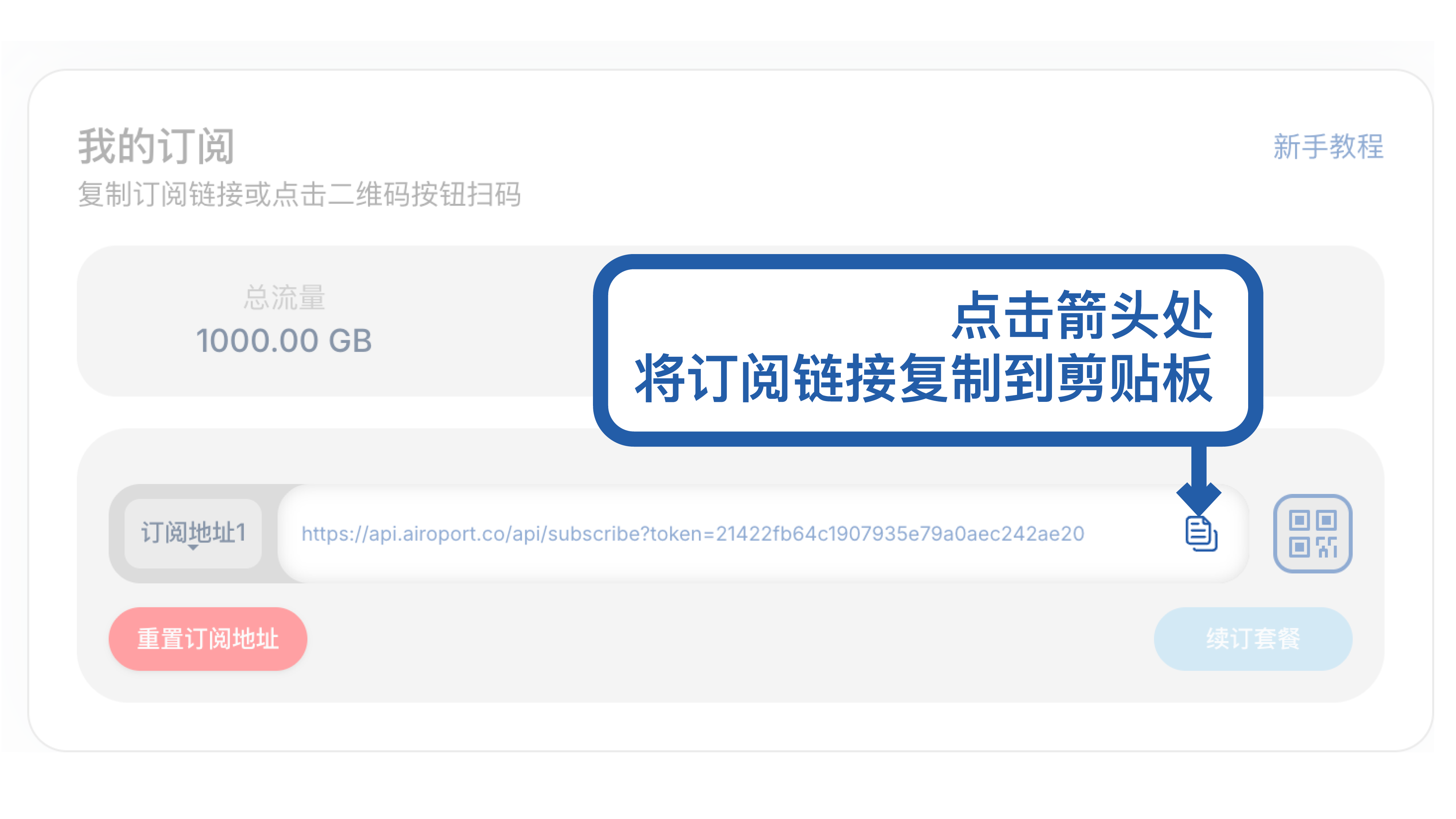
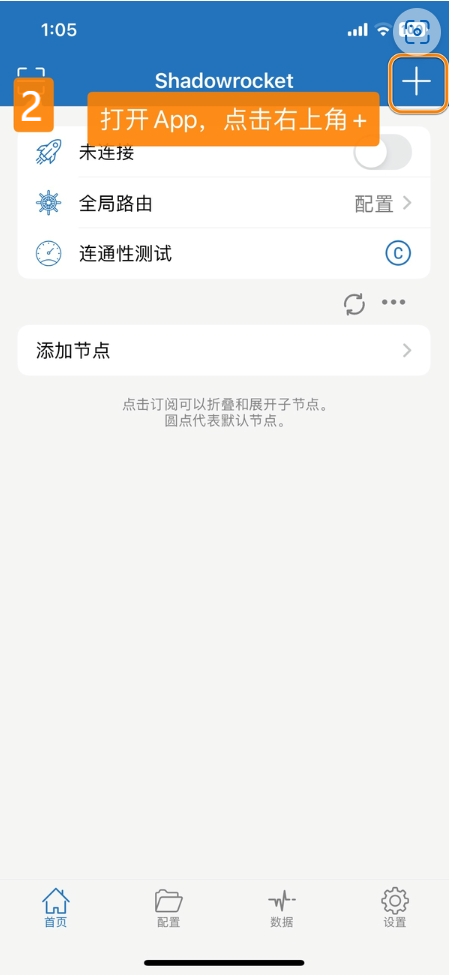
Step 2: Add Subscription
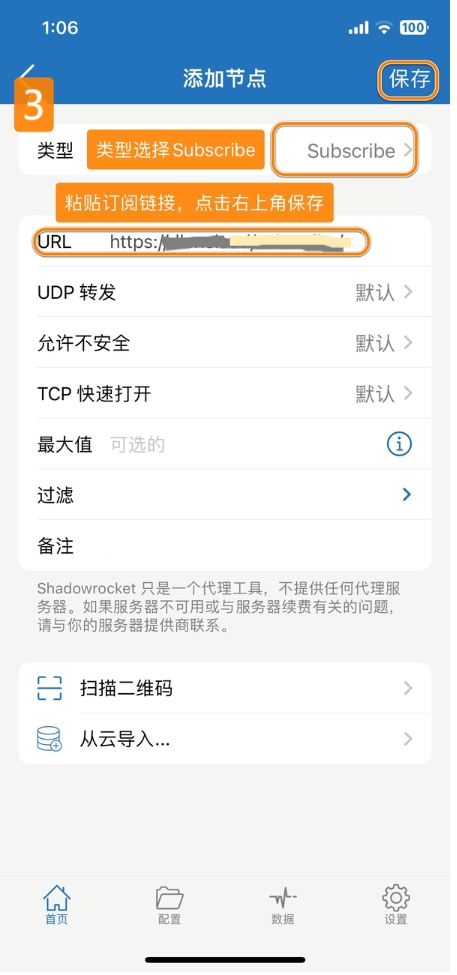
Click the + icon in the top right corner, select Subscribe:
Step 3: Paste Link
Paste the subscription link in the URL box, click Done:
Step 4: Update Subscription
Swipe the subscription entry, click Update to refresh nodes:
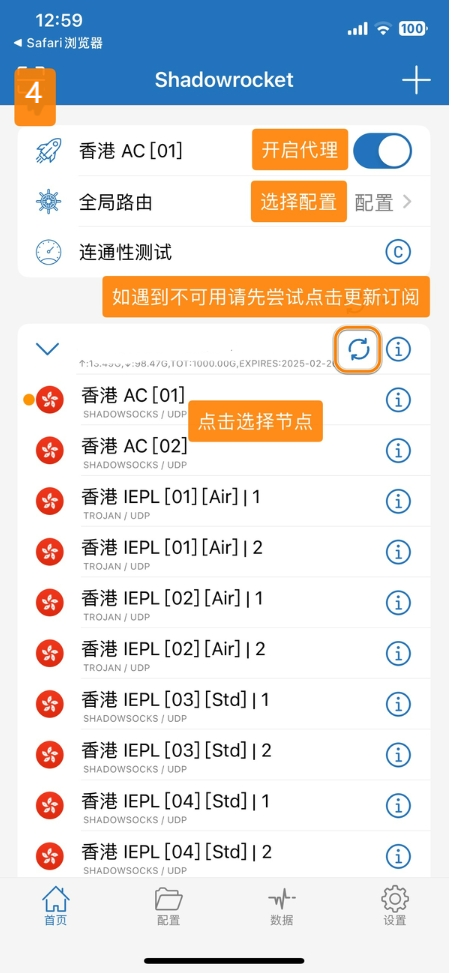
📱 Method 2: QR Code Scanning
- Click the scan icon in the top left corner
- Scan the QR code provided by the service provider
- Automatically recognize and import configuration
⌨️ Method 3: Manual Addition
- Click
+and selectAdd Server - Choose the corresponding protocol type
- Fill in detailed server information
🌐 Usage Guide
🎯 Connect to Server
- Select Node: Choose appropriate server in main interface
- Start Connection: Click the top switch to enable proxy
- Confirm Permissions: First use requires VPN permission grant
- Verify Connection: Check VPN icon in status bar
⚙️ Basic Settings
🔧 Global Routing
- Configuration: Configuration → Default
- Proxy: All traffic through proxy
- Direct: All traffic direct connection
- Scene: Smart splitting (recommended)
📊 Rule Configuration
- Domain Rules: Traffic splitting by domain name
- IP Rules: Traffic splitting by IP address
- GeoIP: Traffic splitting by geographical location
🎛️ Advanced Features
📜 Script Support
- JS Scripts: Support custom JavaScript
- Function Extension: Ad blocking, data modification
- Community Resources: Rich script library
📈 Network Tools
- Ping Test: Check server latency
- Speed Test: Test connection speed
- DNS Query: Domain name resolution tool
🔄 Backup & Restore
- Export Configuration: Backup all settings
- Import Configuration: Quick setting restoration
- iCloud Sync: Multi-device synchronization
❓ Frequently Asked Questions
🔧 Connection Issues
Q: What to do if connection fails?
A: Troubleshooting steps:
- Confirm server information is correct
- Check network connection status
- Try switching to other nodes
- Restart application or device
Q: Slow speed or unstable connection?
A: Optimization suggestions:
- Select nodes with lower latency
- Avoid peak network usage times
- Check local network quality
- Contact service provider customer service
📱 Application Issues
Q: App crashes or freezes?
A: Solutions:
- Restart application
- Restart device
- Check iOS version compatibility
- Clear device storage space
Q: Cannot download application?
A: Notes:
- Confirm using foreign region Apple ID
- Check if account is valid
- Try switching to different region account
🔗 Useful Resources
📚 Learning Materials
🛠️ Tool Recommendations
💡 Usage Tips
⚡ Performance Optimization
- Choose Nodes Wisely: Select servers with low latency and high speed
- Enable Smart Splitting: Avoid unnecessary proxy traffic
- Update Rules Regularly: Keep rule library current
🛡️ Security Recommendations
- Protect Account Security: Don't share Apple ID information
- Choose Trusted Providers: Avoid services from unknown sources
- Update App Timely: Get latest security patches
📅 Last Updated: July 10, 2025 | 🚀 Applicable Version: Shadowrocket 2.2.38