
7.8 KiB
🎮 Netch - Gaming Acceleration Specialized Tool
🚀 Proxy Tool Optimized for Gaming | Process-level precise proxying, focused on game network acceleration
Netch is an open-source network proxy tool designed specifically for Windows platform gaming users, achieving process-level precise network proxying by intelligently scanning game directories to obtain process names that need proxying.
🎯 Product Features
🎮 Gaming-Focused Design
- Process-Level Proxying: Only proxy game-related processes, other system applications are unaffected
- Automatic Game Recognition: Intelligently scan game directories to automatically obtain processes that need proxying
- Gaming Mode Optimization: Connection strategies optimized specifically for gaming network environments
- Latency Optimization: Reduce game network latency and improve gaming experience
⚡ Performance Advantages
- Lightweight Design: Low system resource usage, doesn't affect game performance
- Fast Startup: Quick startup speed, ready to use immediately
- Stable Connection: Stable connections, reducing game disconnections
- Smart Routing: Automatically select optimal network paths
📊 System Support
| Item | Requirement | Recommended | Compatibility |
|---|---|---|---|
| Operating System | Windows 7+ | Windows 10/11 | ✅ Full Support |
| Architecture | 32/64-bit | 64-bit | ✅ Dual Architecture |
| Device Type | PC / Tablet | Gaming PC | 🎮 Gaming Optimized |
| Memory | 1GB+ | 4GB+ | 💾 Low Usage |
| Storage Space | 50MB+ | 200MB+ | 📦 Lightweight |
📥 Official Download
💡 Download Tips: Netch comes as a compressed package, just download and extract to use, no installation required
🌟 Download Source Selection
| Download Source | Type | Stability | Recommendation |
|---|---|---|---|
| 🚀 Mirror Acceleration 1 | Mirror Source | ⭐⭐⭐⭐⭐ | ⭐⭐⭐⭐⭐ |
| ⚡ Mirror Acceleration 2 | Mirror Source | ⭐⭐⭐⭐ | ⭐⭐⭐⭐ |
| 📦 Official GitHub | Official Source | ⭐⭐⭐ | ⭐⭐⭐⭐⭐ |
📋 Version Information
- Current Version: v1.9.7
- File Format: 7z compressed package
- File Size: About 25MB
- Installation: Portable, no installation required
⚠️ Important Usage Notes
🎮 Gaming-Related Tips
⚠️ Performance Note
- Although Netch is designed for gaming, its underlying protocols are not game-specific protocols
- For high-requirement competitive games, performance may not fully meet needs
- Recommend testing before use to confirm suitability for your gaming environment
🚫 Usage Restrictions
- Recommend turning off Netch when using BitTorrent downloads
- Avoid P2P traffic violating service provider terms of use
- Comply with local laws, regulations, and service terms
🛡️ Security Recommendations
- Official Download: Only download from official channels to avoid security risks
- Antivirus Scan: Recommend virus scanning after download
- Firewall Settings: Allow firewall access when first running
- Regular Updates: Keep software at latest version
🚀 Quick Usage Tutorial
📋 Step One: Software Configuration
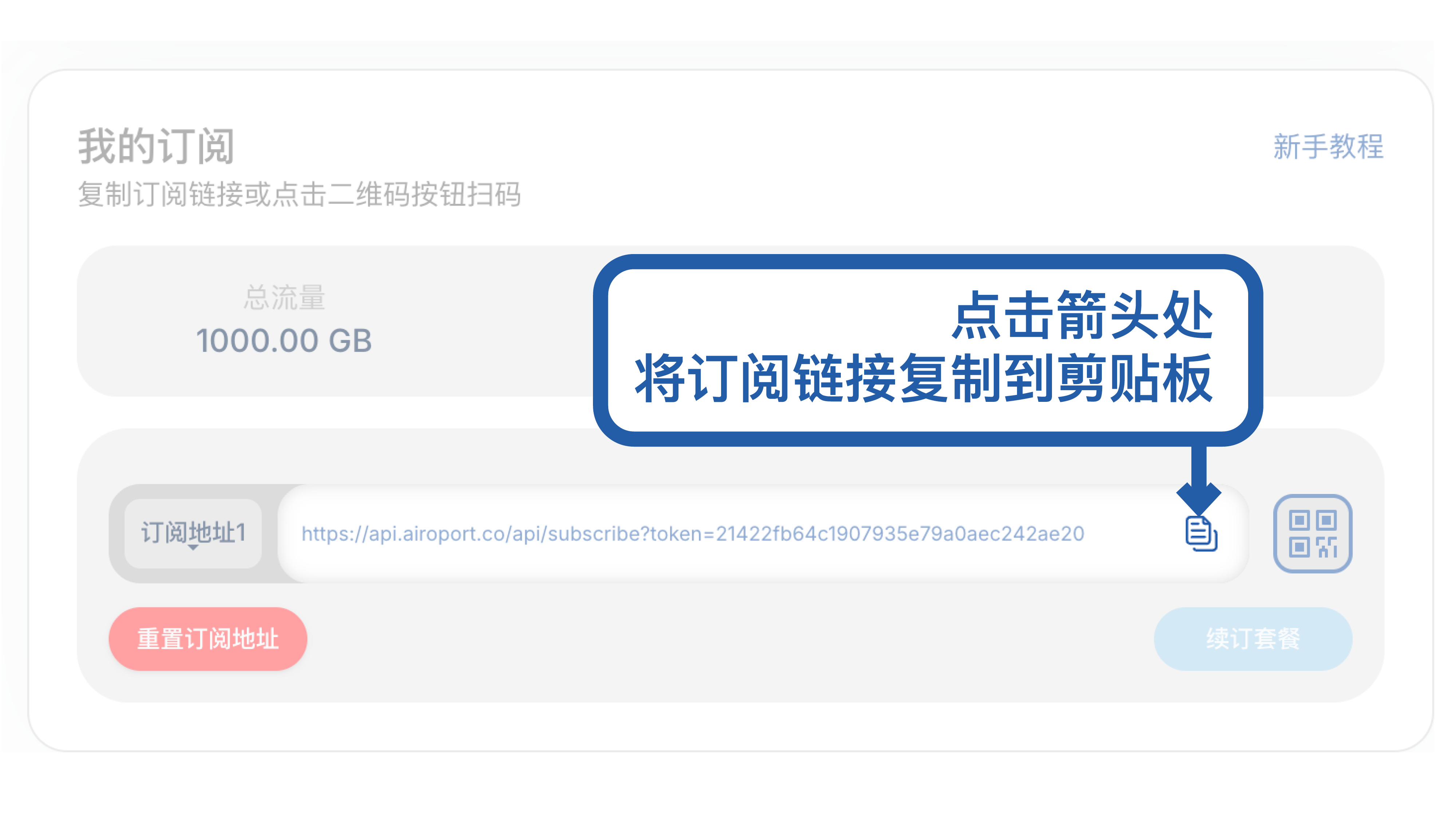
Interface Overview: Familiarize yourself with Netch main interface and basic functions
🔧 Step Two: Server Setup
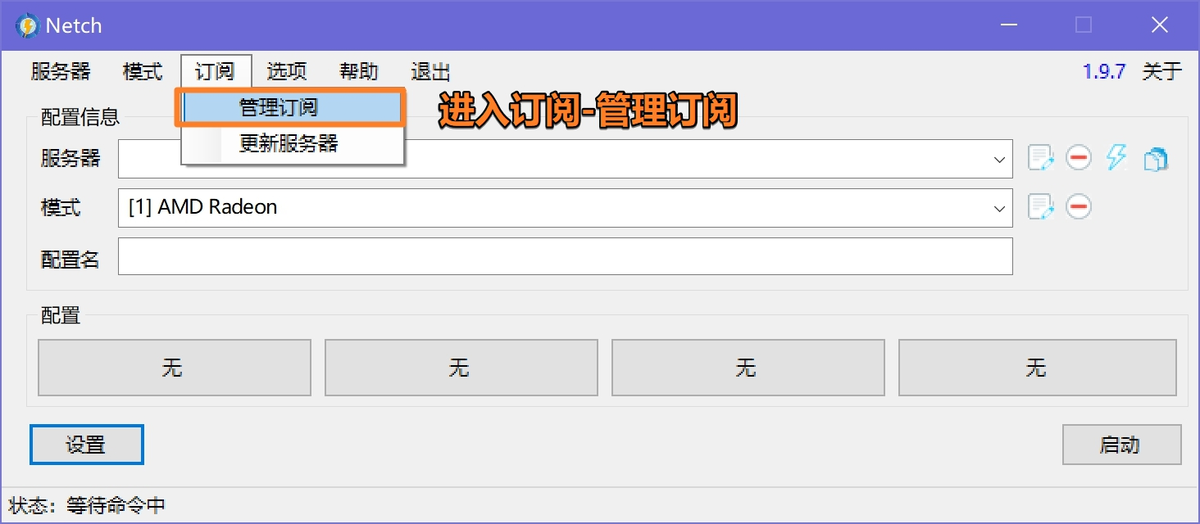
Add Server: Configure proxy server information
🎮 Step Three: Mode Selection
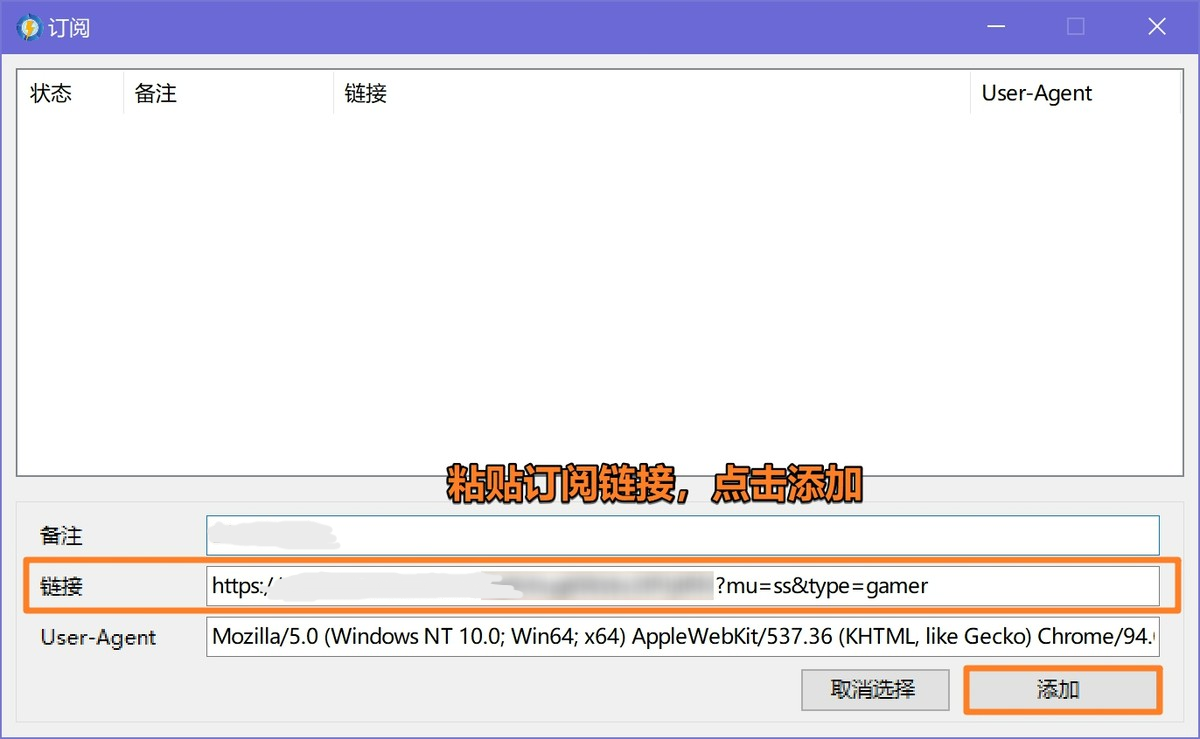
Gaming Mode: Select appropriate game proxy mode
⚙️ Step Four: Advanced Settings
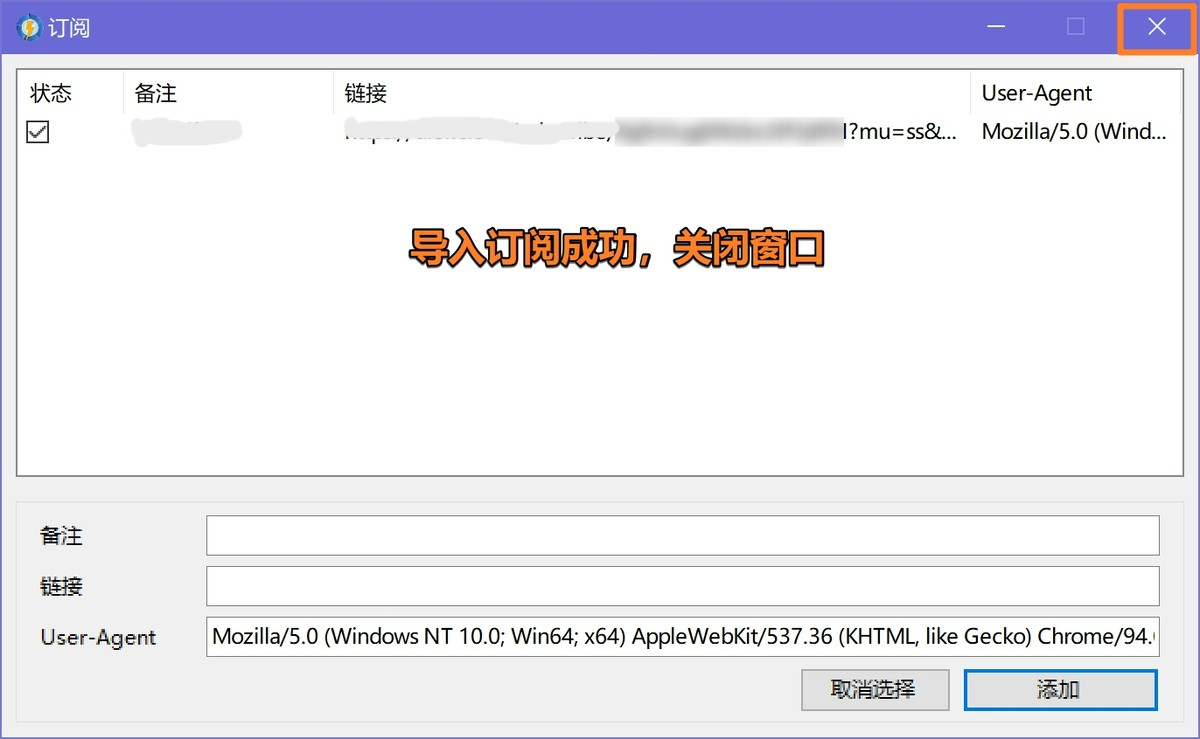
Personalized Configuration: Adjust advanced parameters as needed
🎯 Step Five: Process Management
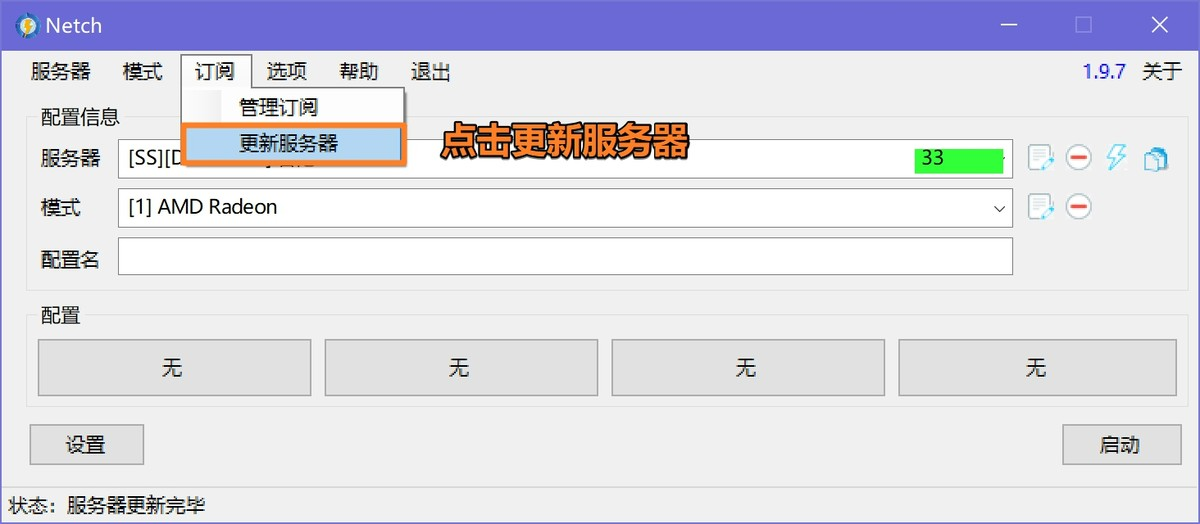
Process Selection: Specify game processes that need proxying
▶️ Step Six: Start Proxy
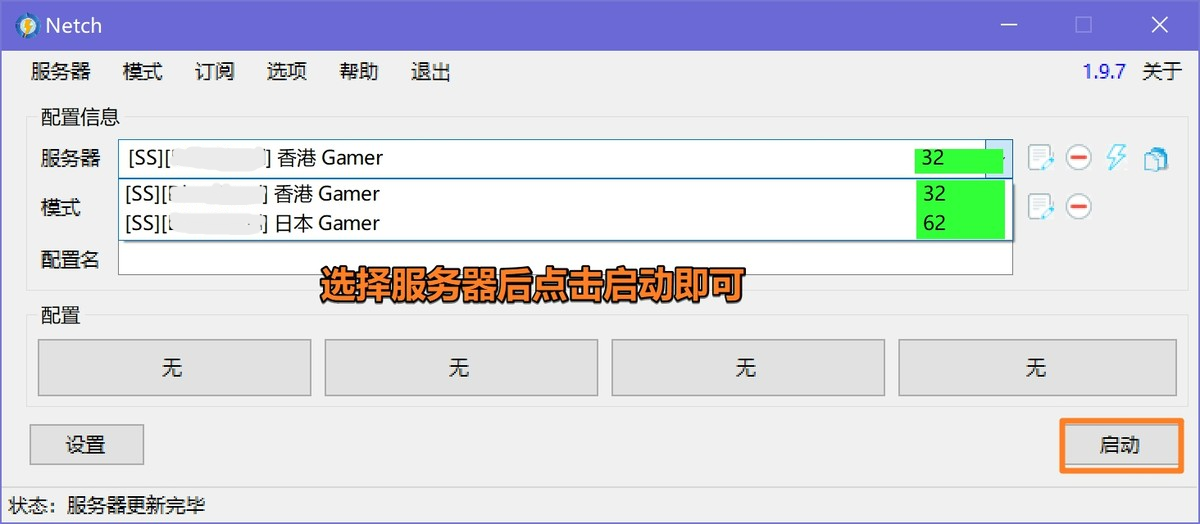
Begin Usage: Start proxy service, begin game acceleration
🎮 Supported Game Types
🎯 Advantageous Game Types
| Game Type | Suitability | Effect | Description |
|---|---|---|---|
| MMORPG | ⭐⭐⭐⭐⭐ | Significant Improvement | Reduce latency, decrease lag |
| FPS Games | ⭐⭐⭐⭐ | Good Improvement | Improve connection stability |
| MOBA Games | ⭐⭐⭐⭐ | Good Improvement | Optimize matchmaking server connections |
| Casual Games | ⭐⭐⭐ | General Improvement | Basic connection optimization |
🎯 Common Game Support
- Steam Games: Supports most Steam platform games
- Epic Games: Supports Epic Store games
- Blizzard Games: World of Warcraft, Hearthstone, Overwatch, etc.
- Tencent Games: League of Legends, CrossFire, etc.
- NetEase Games: Minecraft, Onmyoji, etc.
❓ Frequently Asked Questions
🔧 Installation & Usage
Q: How to extract and run Netch?
A: Usage steps:
- Download 7z compressed package locally
- Use 7-Zip or WinRAR to extract files
- Enter extraction directory, double-click Netch.exe to run
- First run may require administrator permissions
Q: What to do if software doesn't respond after startup?
A: Possible solutions:
- Run as administrator
- Check firewall and antivirus software settings
- Ensure .NET Framework is installed
- Re-download and extract software package
🎮 Gaming-Related
Q: How to configure proxy for specific games?
A: Configuration steps:
- Create new mode in Mode page
- Add game's main program file
- Select appropriate proxy server
- Start mode and run game
Q: What to do if game latency doesn't improve?
A: Optimization suggestions:
- Switch to different proxy server nodes
- Adjust proxy mode configuration
- Check local network environment
- Try other game acceleration solutions
🆚 Software Comparison
| Feature | Netch | Other Game Accelerators | Advantage |
|---|---|---|---|
| Open Source | ✅ Fully Open Source | ❌ Commercial Closed Source | Transparent & Secure |
| Cost | 🆓 Completely Free | 💰 Paid Required | Cost Advantage |
| Customization | ⭐⭐⭐⭐⭐ | ⭐⭐⭐ | Highly Customizable |
| Process Control | ⭐⭐⭐⭐⭐ | ⭐⭐⭐⭐ | Precise Control |
| Ease of Use | ⭐⭐⭐ | ⭐⭐⭐⭐⭐ | Requires some technical knowledge |
| Stability | ⭐⭐⭐⭐ | ⭐⭐⭐⭐⭐ | Depends on configuration quality |
🛠️ Advanced Features
📊 Process Monitoring
- Real-time Monitoring: Display current proxy process status
- Traffic Statistics: Statistics on network usage by each process
- Connection Details: View process network connection information
🎯 Custom Rules
- Rule Editing: Support custom proxy rules
- Process Matching: Precisely match processes that need proxying
- Domain Rules: Smart traffic splitting based on domain names
⚙️ System Integration
- Startup on Boot: Support automatic startup when system starts
- System Tray: Minimize to system tray for operation
- Hotkeys: Support global hotkey operations
📞 Getting Help
- 🌐 Project Homepage: GitHub Repository
- 📋 Issue Feedback: Issues Page
- 📚 Usage Documentation: Wiki Documentation
- 💬 Community Communication: QQ Groups and Telegram Channels
📅 Last Updated: July 10, 2025 | 🎮 Applicable Version: Netch 1.9.7