
8.2 KiB
🚀 v2rayN for Windows
⚡ Windows Platform's Preferred Proxy Client | Multi-protocol support, comprehensive features, easy operation
v2rayN is the most popular graphical proxy client for Windows systems, developed based on the .NET framework, supporting numerous mainstream proxy protocols and providing stable and efficient proxy services.
📊 Protocol Support
| Protocol Type | Support Status | Performance | Rating |
|---|---|---|---|
| 🔗 Shadowsocks (SS) | ✅ Full Support | ⭐⭐⭐⭐ | ⭐⭐⭐⭐ |
| 🛡️ ShadowsocksR (SSR) | ✅ Full Support | ⭐⭐⭐⭐ | ⭐⭐⭐ |
| 🌐 SOCKS5 | ✅ Full Support | ⭐⭐⭐⭐ | ⭐⭐⭐⭐ |
| ⚡ Snell | ✅ Full Support | ⭐⭐⭐⭐⭐ | ⭐⭐⭐⭐ |
| 🚀 V2Ray (VMess) | ✅ Full Support | ⭐⭐⭐⭐⭐ | ⭐⭐⭐⭐⭐ |
| 🛡️ Trojan | ✅ Full Support | ⭐⭐⭐⭐⭐ | ⭐⭐⭐⭐⭐ |
| 🔐 VLESS | ✅ Full Support | ⭐⭐⭐⭐⭐ | ⭐⭐⭐⭐ |
| 🌊 Hysteria | ✅ Full Support | ⭐⭐⭐⭐⭐ | ⭐⭐⭐⭐ |
🔧 System Requirements
💻 Runtime Environment
| Item | Minimum Requirement | Recommended | Description |
|---|---|---|---|
| Operating System | Windows 10 (64-bit) | Windows 10/11 Latest | 64-bit systems only |
| Processor | Intel/AMD Dual-core | Quad-core and above | Supports mainstream CPU architectures |
| Memory | 4GB RAM | 8GB+ RAM | Ensures smooth operation |
| Storage | 100MB+ | 500MB+ | Including config and log files |
| .NET Framework | .NET 6.0+ | Latest version | Required runtime environment |
📥 Official Downloads
💡 Download Recommendation: Download latest version from official GitHub or mirror sources
🌟 Download Source List
| Download Source | Type | Speed | Stability | Rating |
|---|---|---|---|---|
| 🚀 Mirror Acceleration 1 | Mirror Source | ⭐⭐⭐⭐⭐ | ⭐⭐⭐⭐⭐ | ⭐⭐⭐⭐⭐ |
| ⚡ Mirror Acceleration 2 | Mirror Source | ⭐⭐⭐⭐ | ⭐⭐⭐⭐ | ⭐⭐⭐⭐ |
| 📦 Official GitHub | Official Source | ⭐⭐⭐ | ⭐⭐⭐⭐⭐ | ⭐⭐⭐⭐⭐ |
📋 Version Information
- Current Version: v6.60
- Release Date: November 2024
- File Size: ~15MB
- File Format: ZIP archive
🚀 Complete Usage Tutorial
📥 Step 1: Download and Extract
-
Download the software
- Choose any download link above
- Download the
v2rayN.zipfile
-
Extract files
- Extract to your preferred directory
- Ensure path contains no Chinese characters
🚀 Step 2: Launch Application
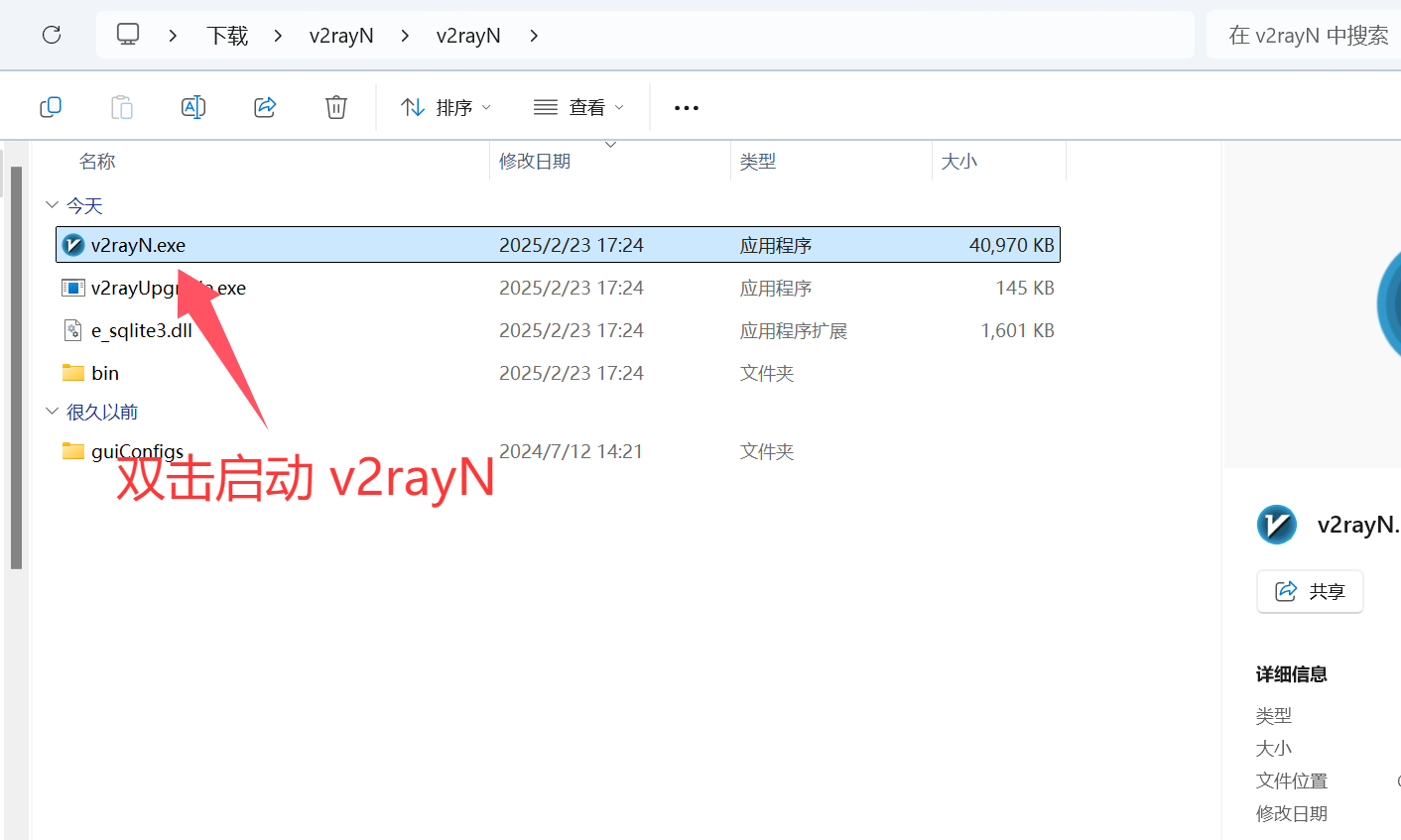
First Launch: Double-click
v2rayN.exeto start the application
📋 Step 3: Copy Subscription
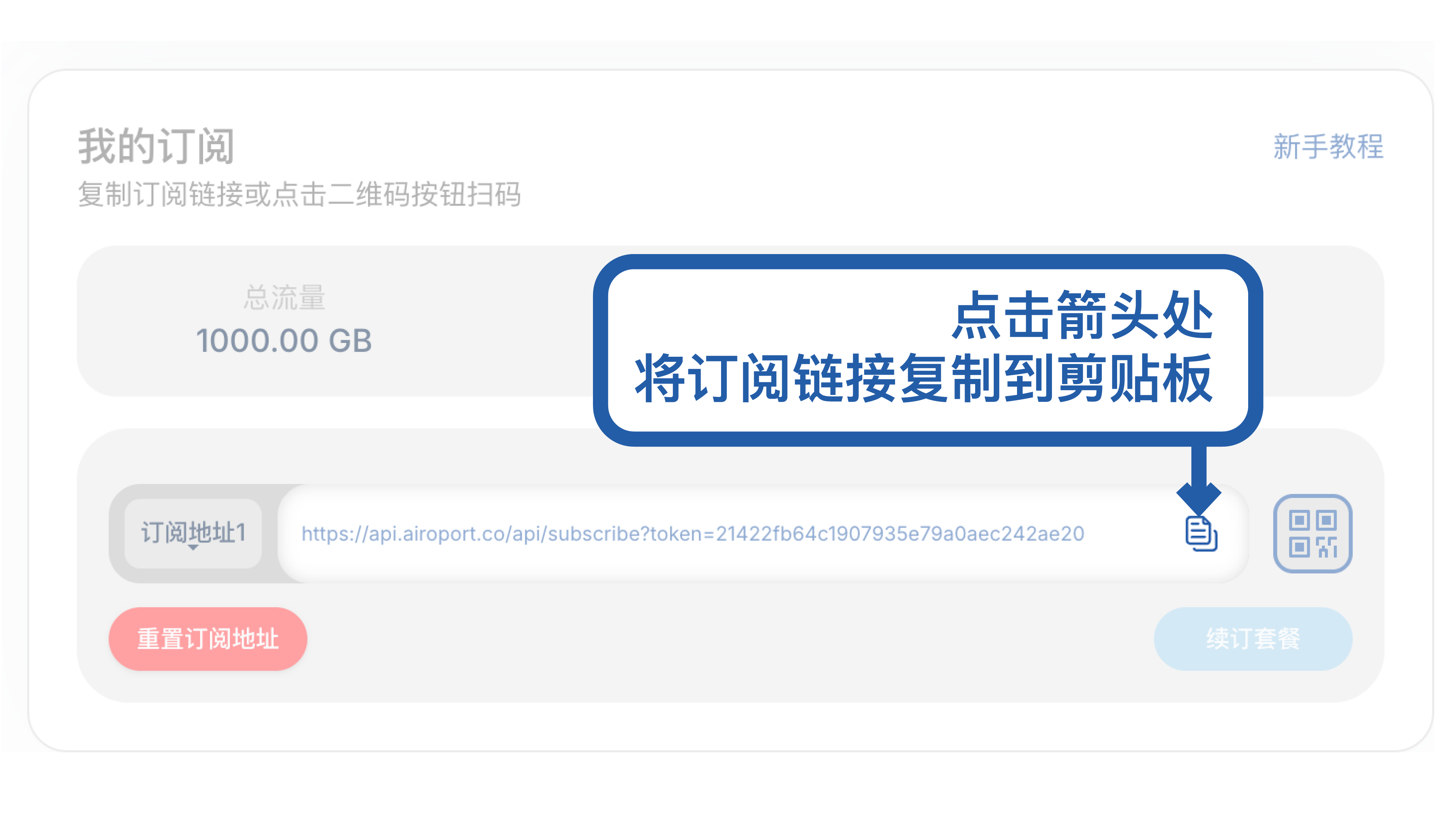
Get Subscription: Copy your subscription link from service provider
📥 Step 4: Import Subscription
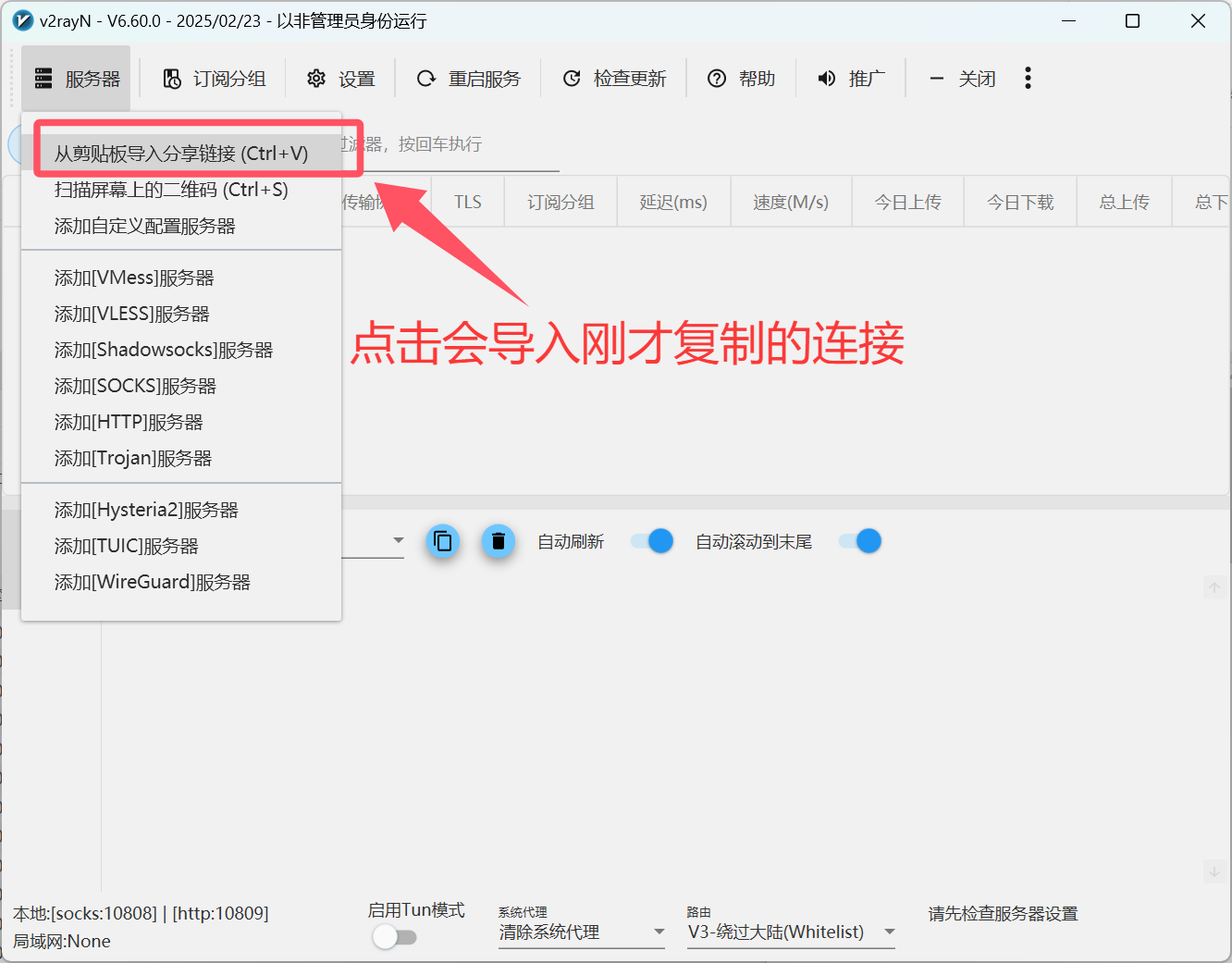
Add Subscription: Paste subscription link in the import dialog
🔄 Step 5: Update Nodes
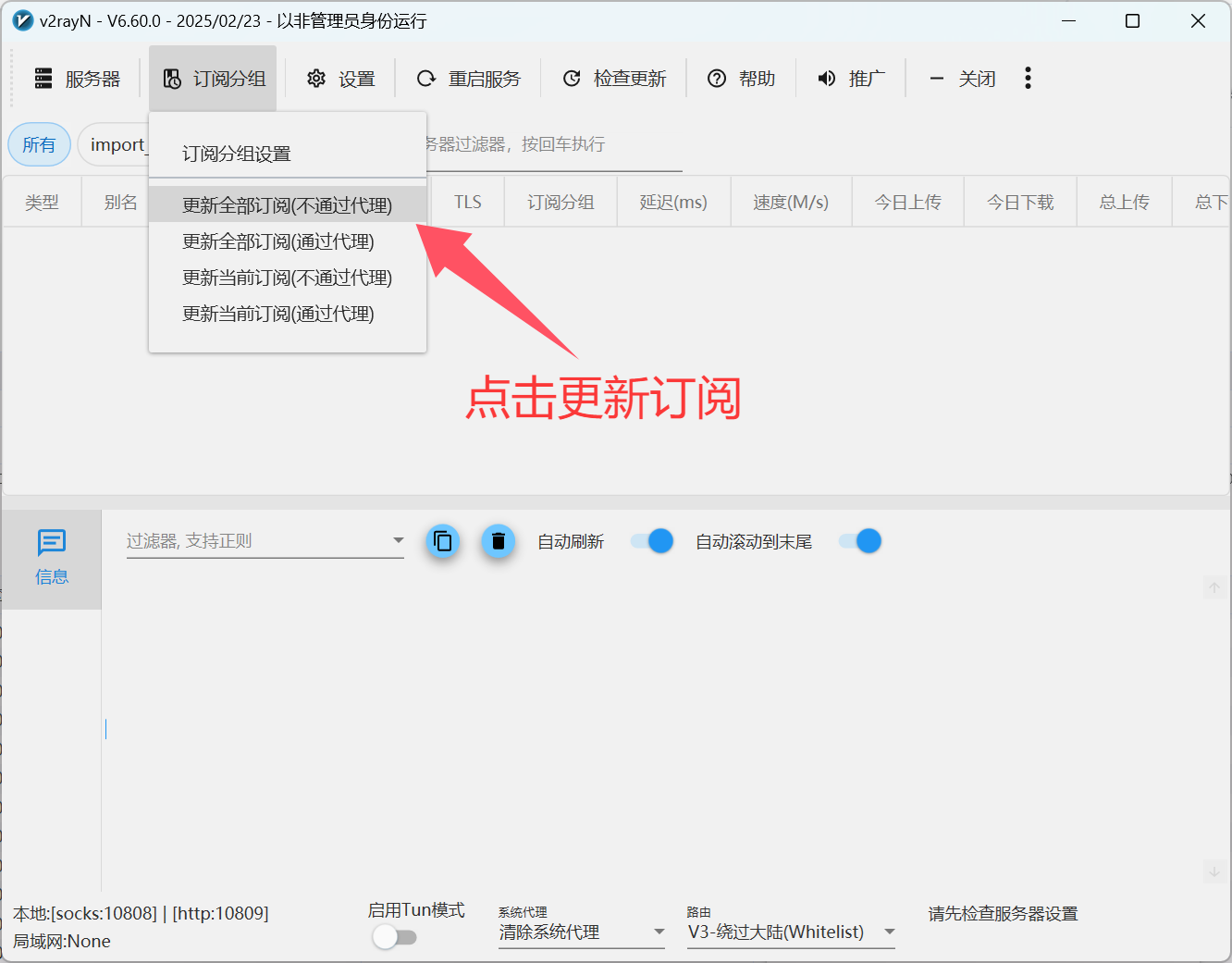
Update Subscription: Refresh to get latest node information
⚡ Step 6: Enable Proxy
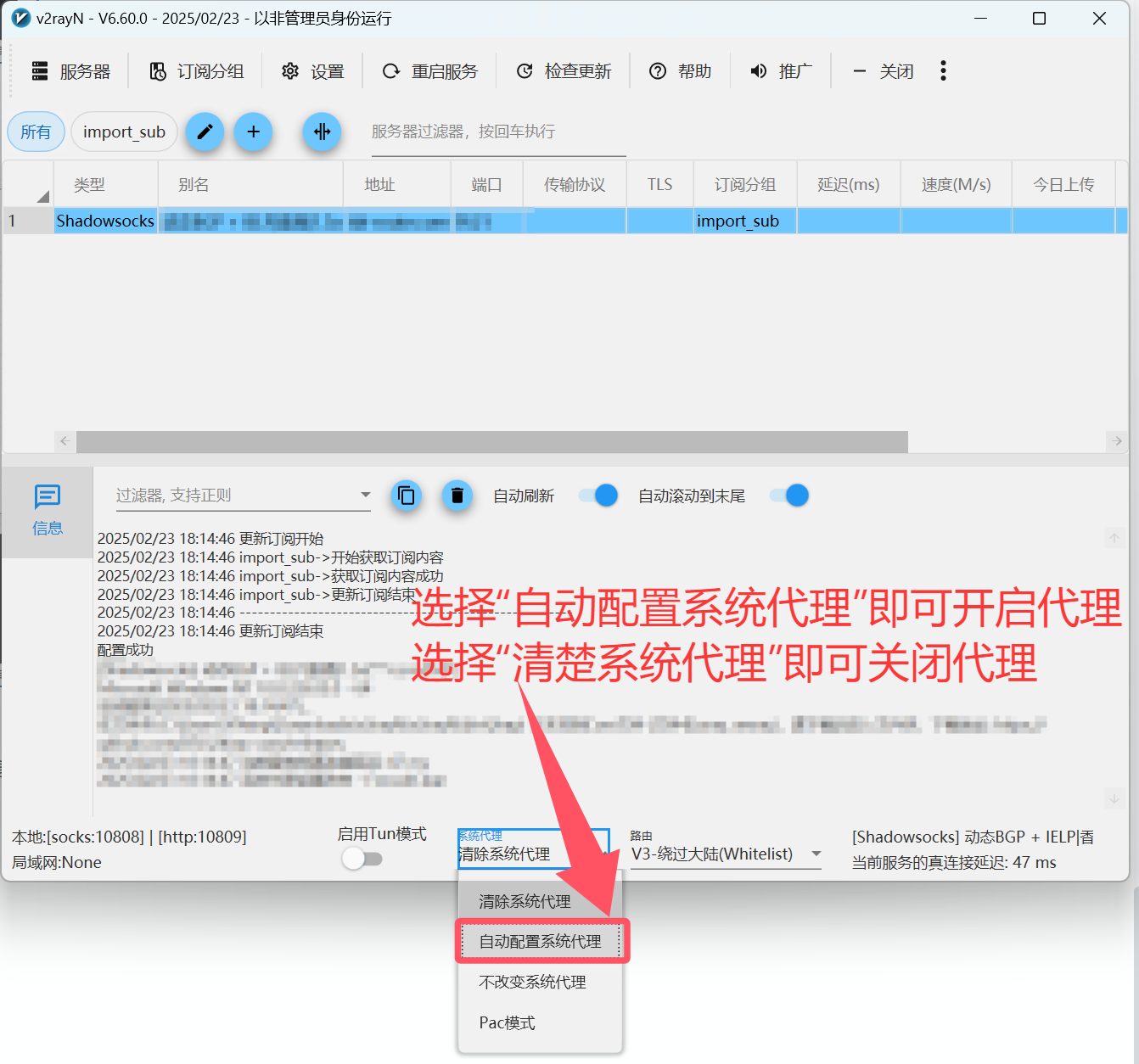
System Proxy: Enable system-wide proxy settings
🔄 Step 7: Switch Nodes
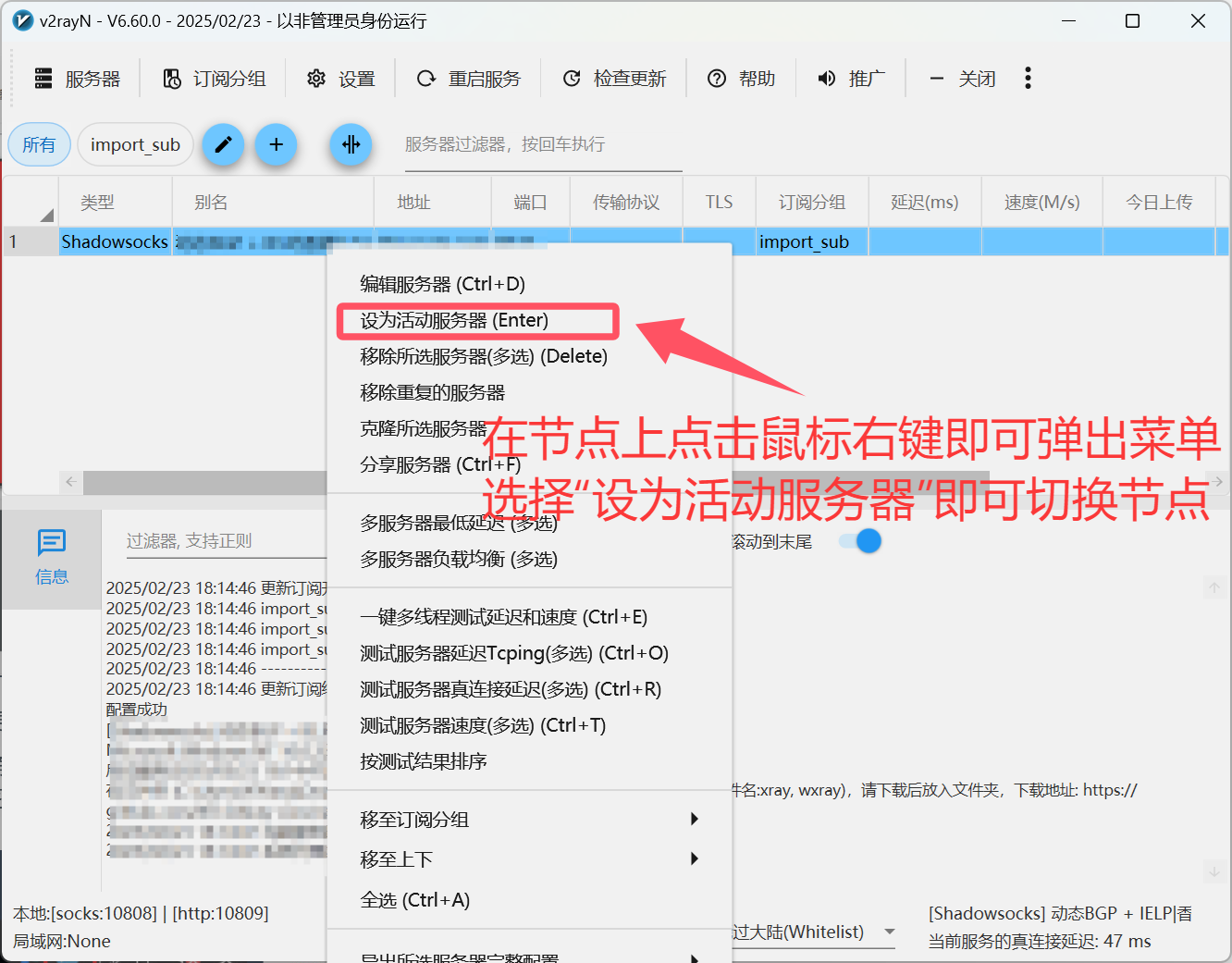
Node Selection: Choose optimal server for your needs
🔴 Step 8: Disable Proxy
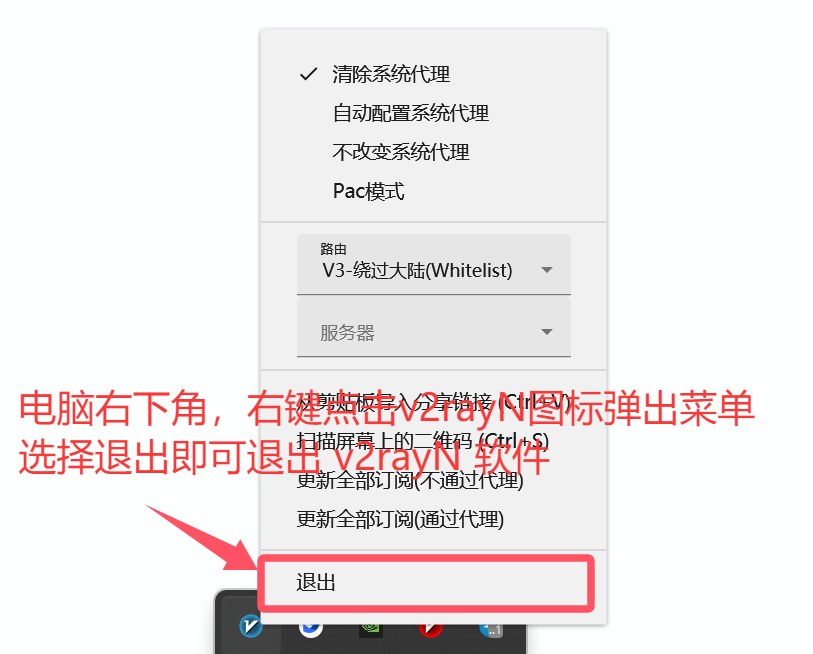
Stop Service: Disable proxy when not needed
🎛️ Advanced Features
🎯 Smart Routing
- PAC Mode: Automatic proxy for blocked sites only
- Global Mode: Route all traffic through proxy
- Direct Mode: Bypass proxy for all traffic
📊 Performance Monitoring
- Real-time Statistics: Monitor upload/download speeds
- Connection Logs: Detailed connection information
- Latency Testing: Test server response times
- Traffic Analysis: Analyze data usage patterns
🔧 Configuration Management
- Multiple Profiles: Support for multiple configuration files
- Auto Updates: Automatic subscription updates
- Backup/Restore: Configuration backup and restoration
- Custom Rules: Advanced routing rule customization
❓ Frequently Asked Questions
🔧 Installation Issues
Q: Software won't start or shows errors?
A: Common solutions:
- Ensure .NET 6.0+ is installed
- Run as administrator
- Check Windows Defender/antivirus settings
- Verify file integrity
Q: "Access denied" error?
A: Permission solutions:
- Extract to a user-writable directory
- Run as administrator
- Add exception to antivirus software
- Check Windows UAC settings
🌐 Connection Issues
Q: Can't connect after configuration?
A: Troubleshooting steps:
- ✅ Verify subscription link validity
- ✅ Check network connectivity
- ✅ Test different server nodes
- ✅ Confirm firewall settings
Q: Slow speeds or frequent disconnections?
A: Performance optimization:
- 🔄 Select servers with lower latency
- 🎯 Switch between different proxy modes
- 📊 Check local network conditions
- 🔧 Try different encryption protocols
⚙️ Configuration Issues
Q: How to update subscription?
A: Update steps:
- Right-click system tray icon
- Select "Update subscription"
- Wait for automatic update completion
Q: How to backup configuration?
A: Backup method:
- Locate configuration files in program directory
- Copy entire folder to safe location
- Restore by replacing files when needed
🔄 Version History
- v6.60 (2024.11): Performance optimization, new protocol support
- v6.50 (2024.09): Interface improvements, bug fixes
- v6.40 (2024.07): Enhanced stability, new features added
💡 Usage Tips
⚡ Performance Optimization
-
Mode Selection
- Use PAC mode for daily browsing
- Global mode for special requirements
- Direct mode for troubleshooting
-
Regular Maintenance
- Update subscriptions weekly
- Clear logs periodically
- Keep software updated
-
Server Optimization
- Choose geographically closer servers
- Select appropriate protocols for use case
- Avoid frequent server switching
🛡️ Security Recommendations
- Service Selection: Use trusted proxy service providers
- Configuration Security: Regularly change passwords and configurations
- Network Security: Avoid using on public networks
📚 Related Resources
📖 Official Documentation
🛠️ Useful Tools
- Configuration Converters: Online converter tools
- Rule Subscriptions: ACL4SSR Rules
- Server Testing: Built-in latency testing feature
🎯 Summary and Evaluation
✅ Advantages
- 🖥️ Native Windows Experience: Perfect Windows system integration
- ⚡ Excellent Performance: Efficient proxy processing capabilities
- 🔧 Professional Features: Rich configuration options
- 🆓 Free and Open Source: No cost, transparent code
❌ Limitations
- 📚 Learning Curve: Requires some learning compared to simple tools
- 🎨 Simple Interface: Relatively basic UI, functionality-focused
- 🔧 Complex Configuration: Advanced features require technical knowledge
🎯 Target Users
- 💻 Windows Users: Optimized for Windows operating system
- 🔧 Tech Enthusiasts: Users who enjoy customization and configuration
- 🛡️ Stability-focused: Users prioritizing long-term stability
- 🆓 Budget-conscious: Those wanting powerful free tools
📅 Last Updated: July 10, 2025 | ⚡ Applicable Version: v2rayN 6.60