
9.4 KiB
📦 sing-box for iOS - Next-Generation Cross-Platform Proxy Tool
🌟 sing-box is an emerging cross-platform proxy software developed in Go, providing modern proxy solutions on iOS platform and representing an excellent example of free and open-source proxy tools.
✨ Product Features
🎯 Core Advantages
- 🆓 Open Source & Free: Completely open source with free iOS version
- 🚀 High Performance: Developed in Go language for excellent performance
- 🌍 Cross-Platform: Unified configuration format for consistent multi-platform experience
- 🔄 Continuous Updates: Active development team with rapid feature iteration
- 🛡️ Modern: Adopts latest networking technologies and security standards
🔗 Protocol Support
| Protocol Type | Support Status | Feature Description |
|---|---|---|
| 🔒 Shadowsocks | ✅ | Full version support, performance optimized |
| 🌟 VMess (V2Ray) | ✅ | Complete functionality support |
| ⚡ VLESS | ✅ | Lightweight protocol |
| 🛡️ Trojan | ✅ | TLS camouflaged traffic |
| 🚀 Hysteria | ✅ | QUIC high-speed protocol |
| 🌊 TUIC | ✅ | New QUIC-based protocol |
| 🔐 WireGuard | ✅ | Modern VPN protocol |
| 🧦 SOCKS5 | ✅ | Universal proxy protocol |
🛠️ Feature Highlights
| Feature Module | Specific Functions | Advantages |
|---|---|---|
| 🌐 Network Core | TUN mode, system proxy | Global traffic takeover |
| 📡 DNS Service | Built-in DNS server | Prevent DNS leaks |
| 🎯 Routing System | Flexible rule engine | Precise traffic splitting |
| 📊 Traffic Monitoring | Real-time statistics and analysis | Detailed usage information |
| 🔧 Configuration Management | JSON configuration format | Standardized configuration |
| 🔄 Hot Reload | Dynamic configuration updates | No service restart needed |
📱 System Requirements
- Minimum Version: iOS 15.0 or higher
- Recommended Version: iOS 16.0 and above
- Compatible Devices: iPhone / iPad
- Storage Requirement: About 100MB available space
- Memory Requirement: 3GB RAM or above recommended
📥 Download & Installation
🏪 App Store Information
🎉 Great News
- sing-box iOS version is completely free
- Not available in China mainland App Store
- Requires non-China mainland Apple ID
- Excellent value compared to other paid apps
💰 Price Comparison
| App | Price | Open Source | Feature Completeness |
|---|---|---|---|
| sing-box | Free | ✅ Open Source | ⭐⭐⭐⭐ |
| Shadowrocket | $2.99 | ❌ Closed Source | ⭐⭐⭐⭐ |
| Quantumult X | $7.99 | ❌ Closed Source | ⭐⭐⭐⭐⭐ |
| Surge | $49.99 | ❌ Closed Source | ⭐⭐⭐⭐⭐ |
🆚 Advantage Comparison
Comparison with other clients:
| Feature Comparison | sing-box | Shadowrocket | Quantumult X |
|---|---|---|---|
| 🏷️ Price | Free | $2.99 | $7.99 |
| 🔓 Open Source | ✅ | ❌ | ❌ |
| 🚀 Performance | ⭐⭐⭐⭐⭐ | ⭐⭐⭐⭐ | ⭐⭐⭐⭐ |
| 📚 Ease of Use | ⭐⭐⭐ | ⭐⭐⭐⭐⭐ | ⭐⭐⭐ |
| 🔧 Functionality | ⭐⭐⭐⭐ | ⭐⭐⭐ | ⭐⭐⭐⭐⭐ |
| 🔄 Update Frequency | ⭐⭐⭐⭐⭐ | ⭐⭐⭐⭐ | ⭐⭐⭐⭐ |
⚠️ Usage Notes
🆓 Free Software Advantages
🎉 Important Notice
- sing-box iOS version is completely free
- Based on open source project with transparent and auditable code
- No need to worry about payment and subscription issues
- Continuous feature updates with community-driven development
🎯 Target Users
📋 Recommended Users
- ✅ Budget-Conscious: Want free but powerful tools
- ✅ Tech Enthusiasts: Love open source software and follow technology development
- ✅ Privacy-Focused: Prefer transparent and auditable code
- ✅ Performance Seekers: Need high-performance proxy solutions
📚 Technical Support Scope
📋 Service Description
- ✅ Basic Configuration: Configuration import and connection tutorials provided
- ✅ Common Issues: Basic usage questions answered
- ❌ Advanced Configuration: Complex routing and rule configuration not provided
- ❌ JSON Editing: Manual configuration file editing guidance not provided
- 💡 Learning Resources: Recommend official documentation and community support
🚀 Usage Tutorial
📋 Prerequisites
Before starting, please ensure:
- ✅ sing-box downloaded and installed from App Store
- ✅ Valid proxy service configuration available
- ✅ Basic understanding of JSON configuration format
- ✅ Device network connection is normal
🛠️ Basic Configuration
🔗 Configuration Import Process
Step 1: Launch Application
Open sing-box and enter the main interface:
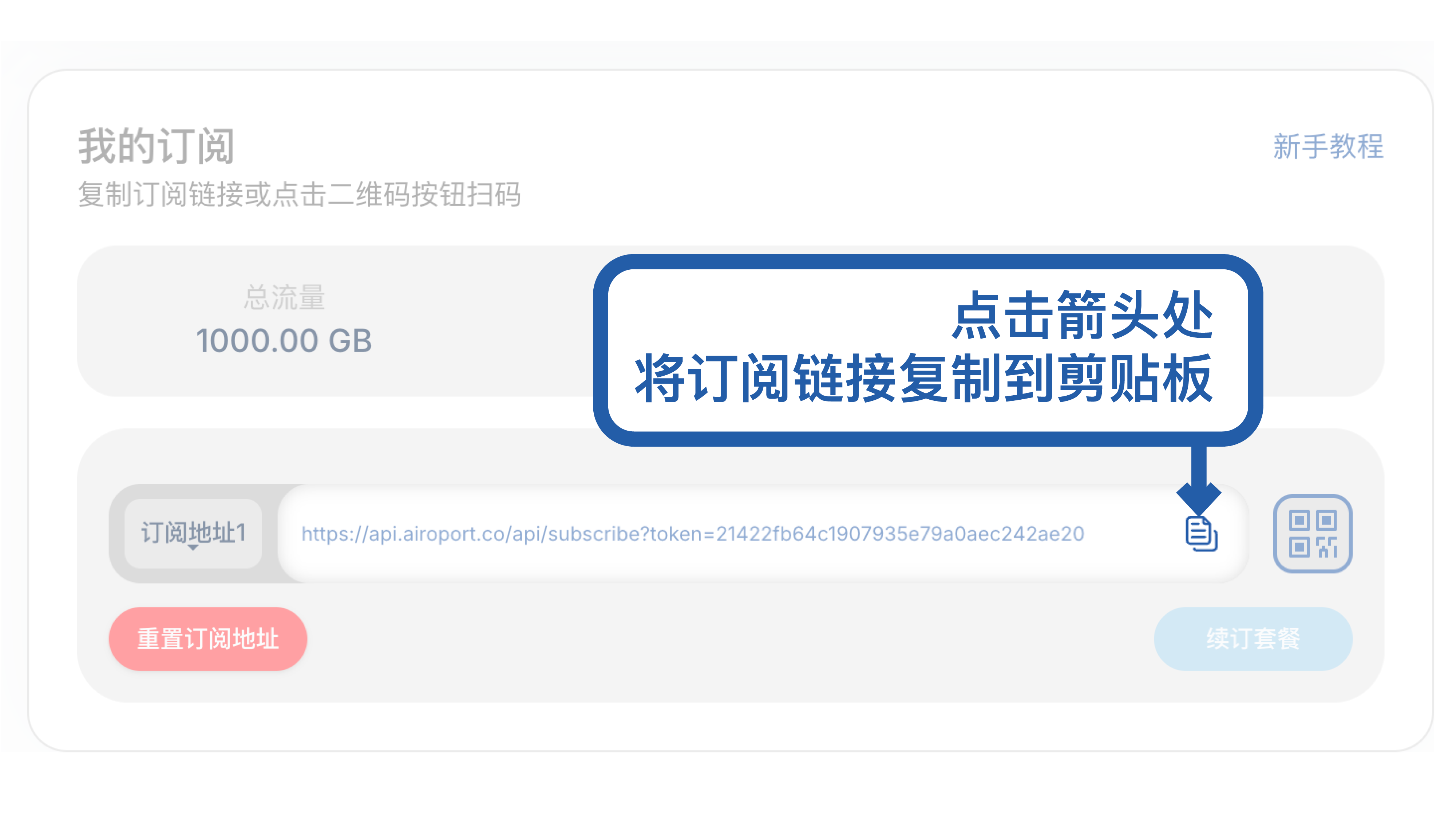
💡 First launch will require permission setup, please follow the prompts
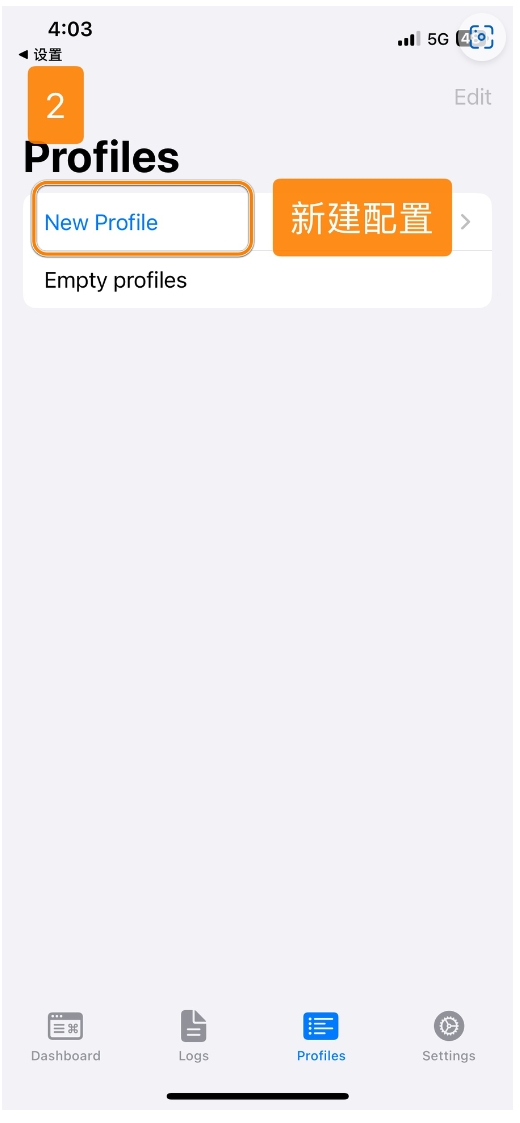
Step 2: Add Configuration
Click the "+" button to add new configuration:
Step 3: Import Method
Choose configuration import method (URL, file, or manual):
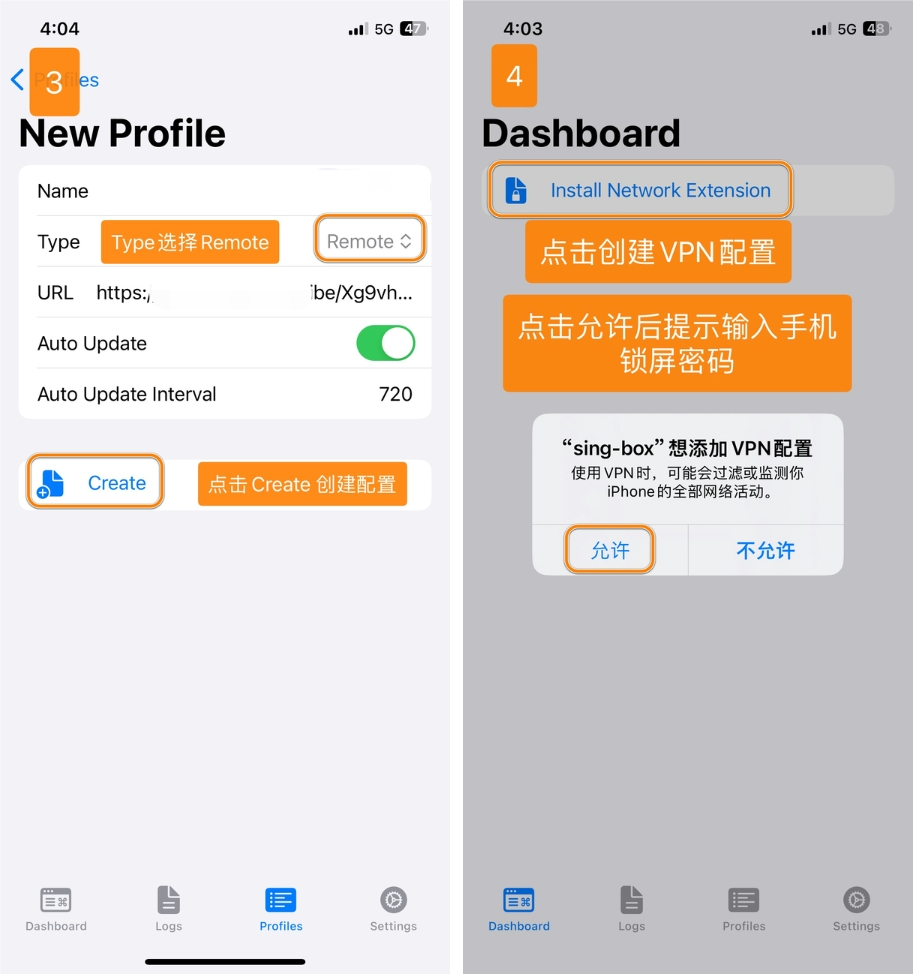
Step 4: Configuration Details
Enter configuration information and save:
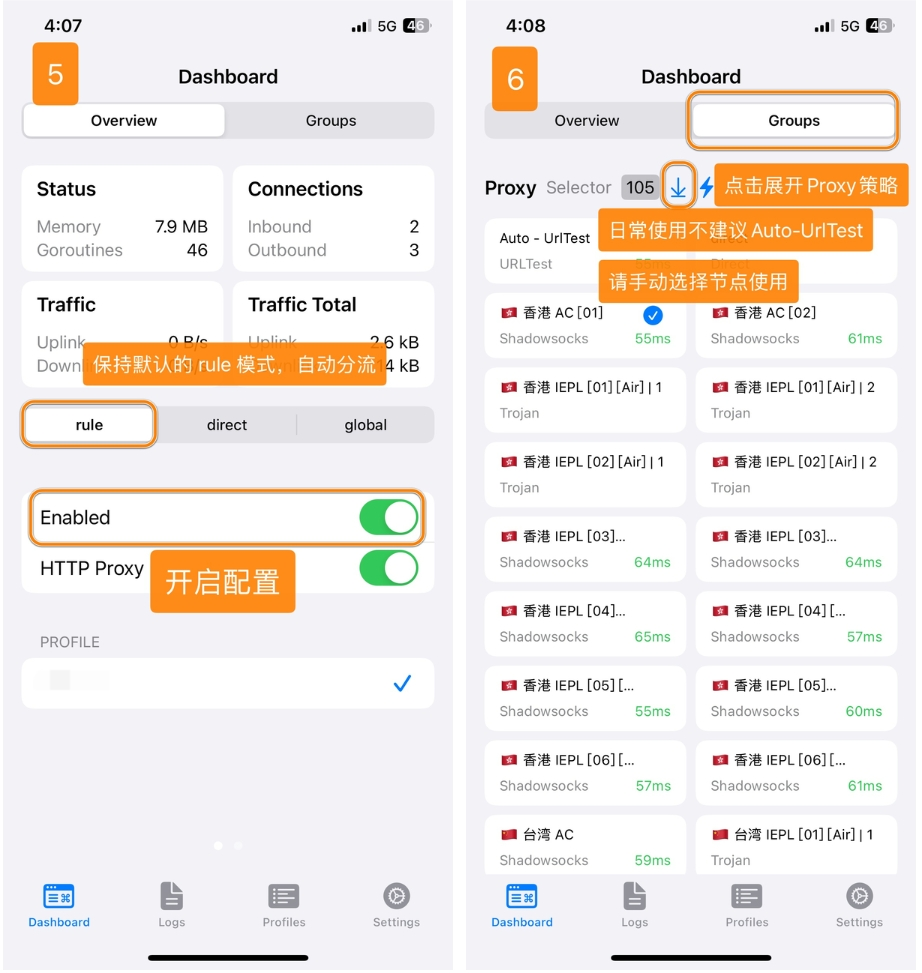
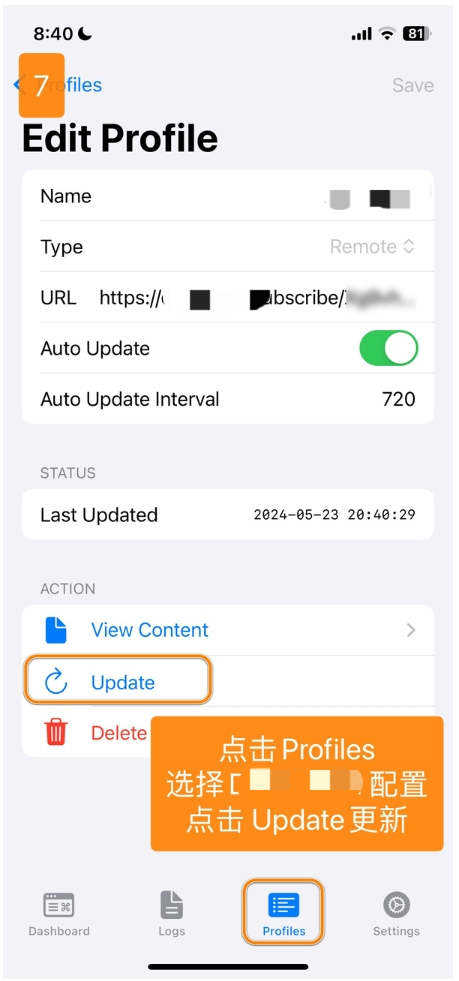
Step 5: Enable Connection
Select configuration and start proxy service:
🎛️ Advanced Features
🌐 TUN Mode
- Global Proxy: System-level traffic interception
- DNS Hijacking: Built-in DNS server prevents leaks
- Route Table: Custom routing rules for precise control
📊 Traffic Monitoring
- Real-time Statistics: Live traffic speed and usage monitoring
- Connection Details: View active connections and protocols
- Historical Data: Traffic usage history and analytics
🔧 Configuration Management
- JSON Format: Standard configuration file format
- Hot Reload: Dynamic configuration updates without restart
- Profile Switching: Quick switching between multiple configurations
❓ Frequently Asked Questions
🔧 Configuration Issues
Q: Configuration import failed?
A: Troubleshooting steps:
- Verify configuration file format is correct JSON
- Check network connectivity for URL imports
- Ensure proxy server information is accurate
- Try manual configuration entry
Q: Connection established but no internet access?
A: Common solutions:
- Check TUN permission is granted
- Verify DNS settings are correct
- Test with different proxy nodes
- Review routing rules configuration
📱 Performance Issues
Q: High battery consumption?
A: Optimization tips:
- Disable unnecessary routing rules
- Use direct connection for local traffic
- Reduce logging verbosity
- Close unused features
Q: Slow connection speeds?
A: Performance optimization:
- Select geographically closer servers
- Use appropriate encryption methods
- Check local network quality
- Optimize routing configuration
🔗 Related Resources
📚 Official Resources
🌟 Community Resources
🛠️ Tools & Utilities
💡 Usage Tips
⚡ Performance Optimization
- Efficient Routing: Use precise rules to minimize unnecessary processing
- DNS Configuration: Use reliable DNS servers for better resolution
- Regular Updates: Keep both app and configurations up to date
🛡️ Security Best Practices
- Configuration Security: Only use trusted configuration sources
- Privacy Protection: Review and understand what data is processed
- Update Vigilance: Keep software updated for latest security patches
🎯 Summary & Evaluation
✅ Advantages
- 🆓 Completely Free: No cost barrier for high-quality proxy tool
- 🔓 Open Source: Transparent code for security and trust
- 🚀 High Performance: Go language provides excellent speed and efficiency
- 🔄 Active Development: Regular updates and feature improvements
❌ Considerations
- 📚 Learning Curve: JSON configuration may be challenging for beginners
- 🎨 Interface Simplicity: Less polished UI compared to paid alternatives
- 📖 Documentation: Community-driven support may vary in quality
- 🔧 Advanced Features: Some enterprise features may be limited
🎯 Recommended For
- 🆓 Budget Users: Those seeking free but powerful proxy solutions
- 🔓 Open Source Advocates: Users who prefer transparent and auditable software
- 🚀 Performance Enthusiasts: Those who prioritize speed and efficiency
- 🌍 Cross-Platform Users: Those using multiple operating systems
📅 Last Updated: July 10, 2025 | 📦 Applicable Version: sing-box for iOS 1.8.0