
14 KiB
📦 sing-box - Next-Generation Cross-Platform Proxy Tool

🌟 sing-box is an emerging cross-platform proxy software that has gained user favor for its excellent performance, modern architecture, and completely free nature.
✨ Product Highlights
🎯 Core Advantages
- 🆓 Completely Free: Open source project, permanently free to use
- 🌍 Cross-Platform Support: Windows, macOS, Linux, Android, iOS
- 🚀 Exceptional Performance: Developed in Go language with high-performance architecture
- 🔄 Continuous Updates: Active development team with regular maintenance updates
- 🛡️ Secure & Reliable: Modern security mechanisms with transparent open source code
🌟 Featured Functions
| Feature | Description | Advantages |
|---|---|---|
| 🎭 Multiple Inbounds | Support for various inbound protocols | Flexible configuration |
| 🔀 Smart Routing | Powerful routing rule system | Precise traffic splitting |
| 📊 Real-time Monitoring | Detailed connection and traffic statistics | Easy management |
| 🔧 Hot Reload | Support for configuration hot reload | No restart required |
| 🎯 DNS Optimization | Built-in DNS server | Accelerated resolution |
🔗 Protocol Support
| Protocol Type | Support Status | Feature Description |
|---|---|---|
| 🔒 Shadowsocks | ✅ | Full functionality support including various encryption algorithms |
| 🌟 VMess | ✅ | V2Ray protocol with complete features |
| 🛡️ Trojan | ✅ | TLS traffic disguise, secure and reliable |
| 🚀 Hysteria 2 | ✅ | High-speed QUIC-based protocol |
| ⚡ VLESS | ✅ | Lightweight protocol with excellent performance |
| 🔐 WireGuard | ✅ | Modern VPN protocol |
| 🌊 TUIC | ✅ | New QUIC-based protocol |
📱 System Requirements
- Minimum Version: Android 5.0 (API 21) and above
- Recommended Version: Android 8.0 and above
- Compatible Devices: Android phones / tablets
- Architecture Support: ARM64, ARM, x86_64
- Storage Required: Approximately 80MB available space
- Memory Required: Recommended 2GB RAM or more
📥 Download & Installation
🔗 Official Release
📌 Version Note: sing-box provides an Android version called SFA (sing-box for Android)
| Download Source | Version | Filename |
|---|---|---|
| 🏠 GitHub Release | 1.10.1 | SFA-1.10.1-universal.apk |
| 🚀 Mirror Accelerator 1 | 1.10.1 | Accelerated Download |
| 🚀 Mirror Accelerator 2 | 1.10.1 | Backup Link |
🛠️ Installation Guide
-
Preparation
- Ensure device meets system requirements
- Allow installation from unknown sources
-
Download & Install
- Choose appropriate download source
- Download APK file to device
- Tap file to begin installation
-
Grant Permissions
- Grant network access permissions
- Allow VPN connection permissions (on first startup)
🚀 Usage Tutorial
📋 Quick Start
🔥 Configuration Flow
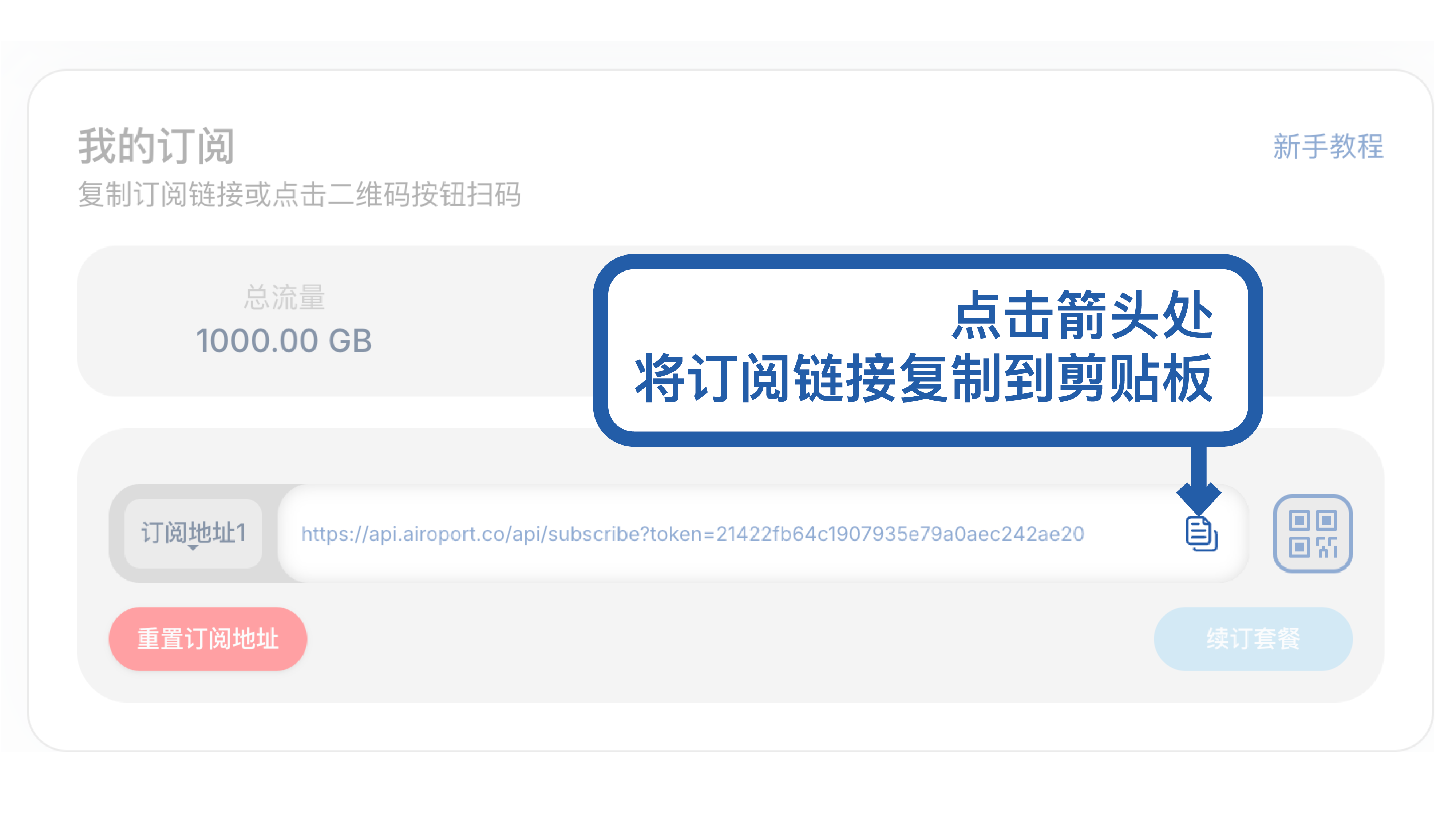
- 📱 Launch Application - Open sing-box (SFA)
- 📂 Import Configuration - Add configuration files or subscriptions
- 🌐 Select Server - Choose from available nodes
- 🚀 Start Service - Enable proxy connection
- ✅ Verify Connection - Confirm network proxy is functioning
🎯 Detailed Operation
🌟 Step 1: Application Launch
Open the installed sing-box and enter the application homepage:
💡 First Startup Tip: The app will request VPN permissions, please select "Allow"
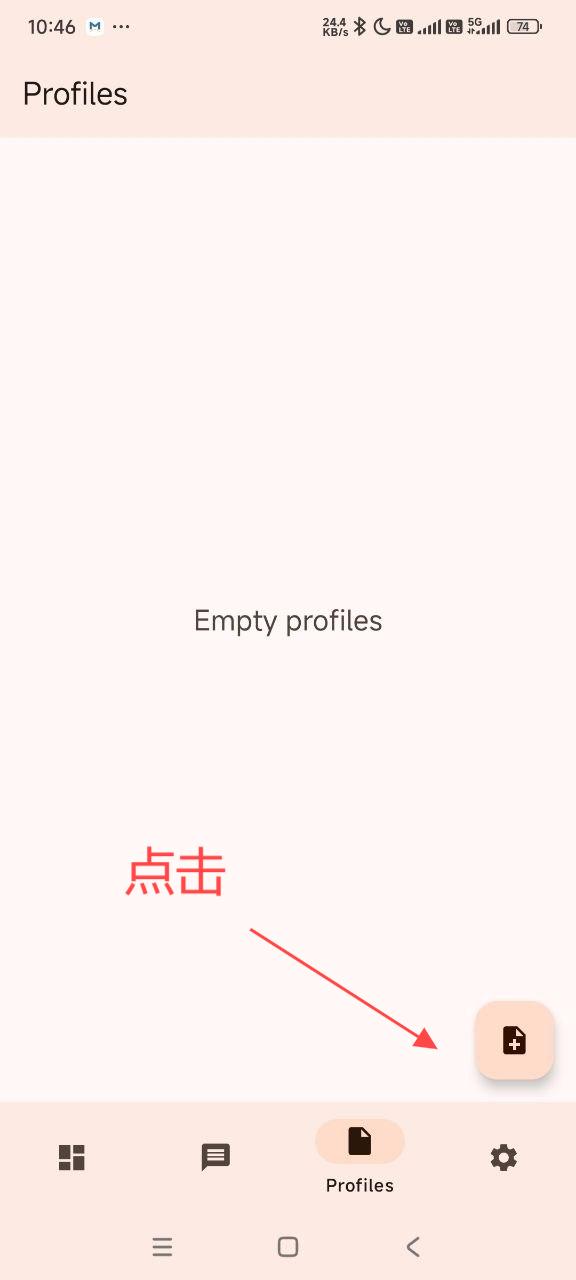
⚙️ Step 2: Configuration Options
Tap "Configuration" or "Profiles" to enter configuration management:
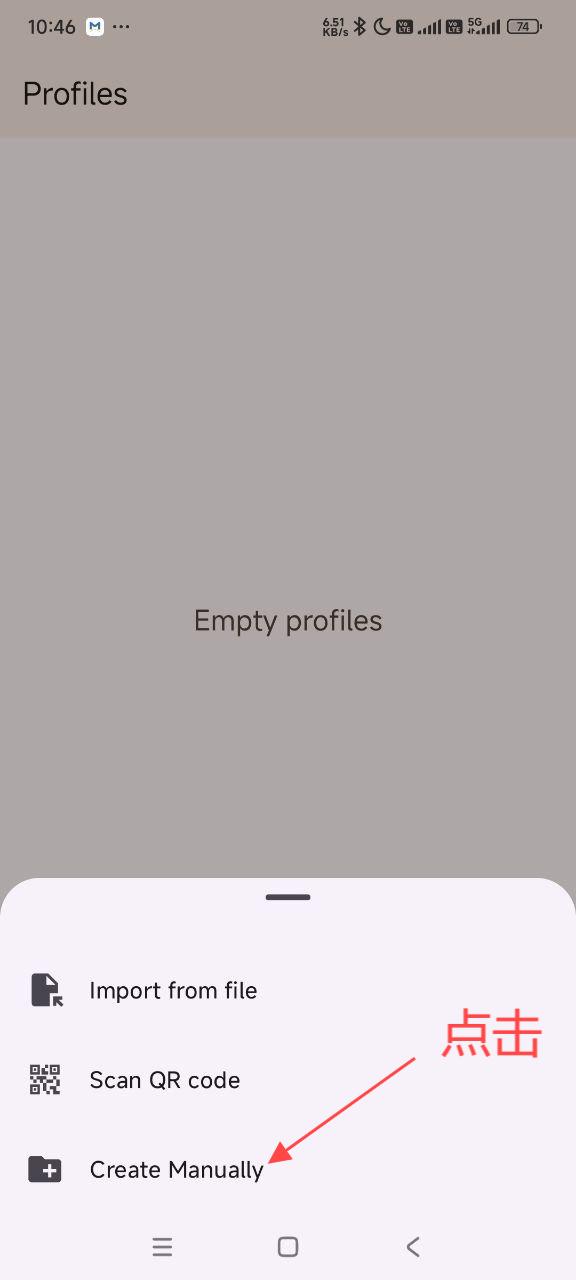
📥 Step 3: Import Configuration
Select import method (URL subscription, local file, or manual configuration):
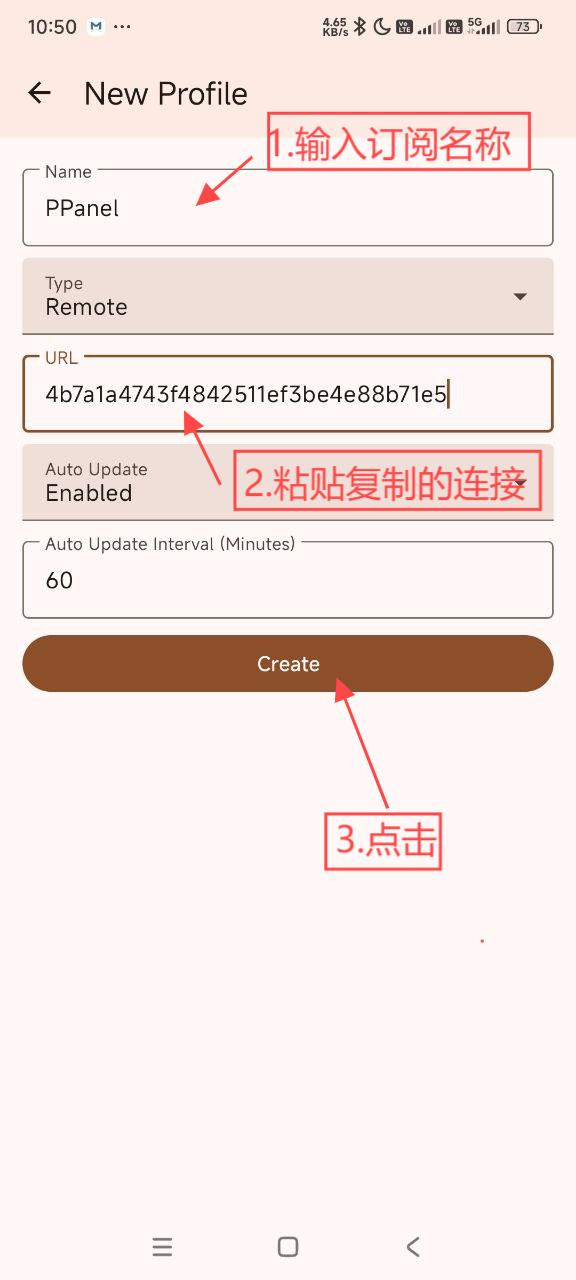
✅ Step 4: Configuration Confirmation
Check imported configuration information and confirm it's correct:
🌐 Step 5: Node Selection
Select appropriate servers from the available node list:
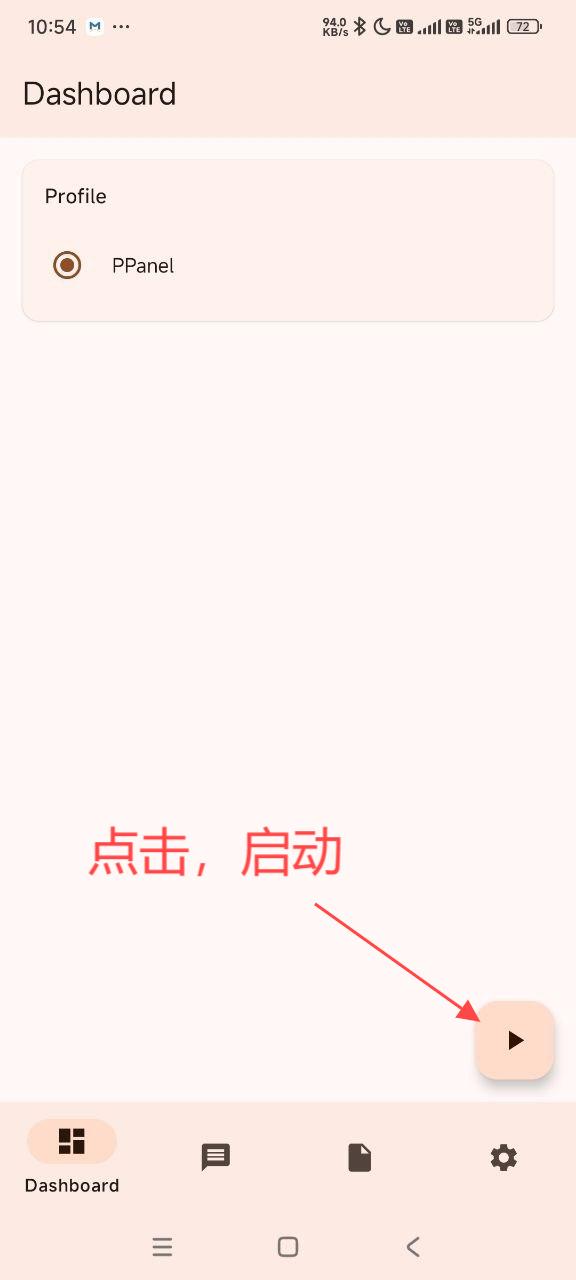
🚀 Step 6: Start Connection
Return to main interface and start the proxy service:
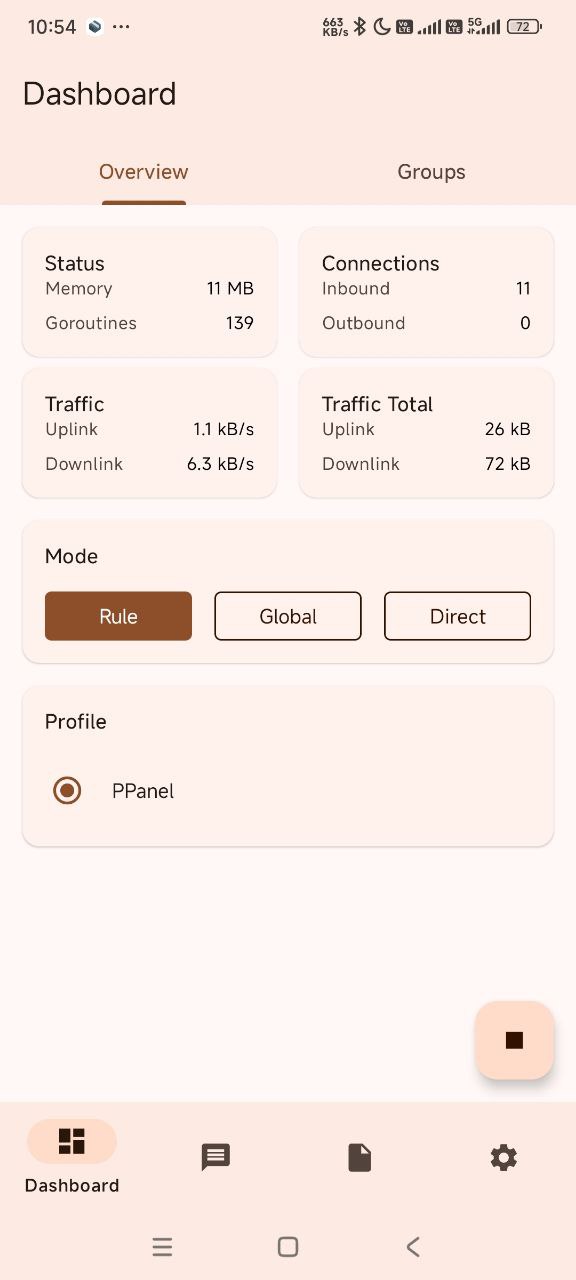
🎛️ Advanced Configuration
📊 Routing Rules
🎯 Rule Types
- Domain Rules: Smart traffic splitting based on domain names
- IP Rules: Precise routing based on target IP addresses
- GeoIP Rules: Automatic routing based on geographical location
- Process Rules: Traffic splitting based on application processes (requires root)
📋 Rule Configuration Examples
{
  "route": {
    "rules": [
      {
        "domain_suffix": [".cn", ".com.cn"],
        "outbound": "direct"
      },
      {
        "geoip": ["cn"],
        "outbound": "direct"
      },
      {
        "domain_suffix": [".google.com", ".youtube.com"],
        "outbound": "proxy"
      }
    ],
    "final": "proxy"
  }
}
🔄 Outbound Configuration
🌐 Connection Modes
- Direct Mode: Traffic connects directly to target
- Proxy Mode: Forward through proxy servers
- Block Mode: Block specific traffic
- DNS Mode: DNS queries only
⚙️ Advanced Outbound Settings
{
  "outbounds": [
    {
      "type": "shadowsocks",
      "tag": "proxy",
      "server": "example.com",
      "server_port": 443,
      "method": "chacha20-ietf-poly1305",
      "password": "your_password"
    },
    {
      "type": "direct",
      "tag": "direct"
    },
    {
      "type": "block",
      "tag": "block"
    }
  ]
}
📈 Monitoring & Statistics
📊 Real-time Metrics
- Live Traffic: Display current network speed
- Historical Statistics: View traffic usage history
- Connection Information: Show active connection details
- Log Records: Detailed runtime logs
📈 Performance Tracking
| Metric | Description | Update Frequency |
|---|---|---|
| 🚀 Speed | Current transfer rates | Real-time |
| 📊 Data Usage | Total data consumed | Continuous |
| 🔗 Connections | Active connection count | Real-time |
| ⏱️ Latency | Response time to servers | Periodic |
🎯 Configuration Examples
📝 Basic Configuration
{
  "log": {
    "level": "info"
  },
  "inbounds": [
    {
      "type": "tun",
      "inet4_address": "172.19.0.1/30",
      "inet6_address": "fdfe:dcba:9876::1/126",
      "auto_route": true,
      "strict_route": false
    }
  ],
  "outbounds": [
    {
      "type": "shadowsocks",
      "server": "example.com",
      "server_port": 443,
      "method": "chacha20-ietf-poly1305",
      "password": "your_password"
    },
    {
      "type": "direct",
      "tag": "direct"
    }
  ],
  "route": {
    "rules": [
      {
        "geoip": "cn",
        "outbound": "direct"
      }
    ]
  }
}
🎭 Advanced Multi-Outbound Configuration
{
  "outbounds": [
    {
      "type": "selector",
      "tag": "proxy",
      "outbounds": ["server1", "server2", "server3"]
    },
    {
      "type": "urltest",
      "tag": "auto",
      "outbounds": ["server1", "server2", "server3"],
      "url": "http://www.gstatic.com/generate_204",
      "interval": "10m"
    },
    {
      "type": "shadowsocks",
      "tag": "server1",
      "server": "server1.example.com",
      "server_port": 443,
      "method": "chacha20-ietf-poly1305",
      "password": "password1"
    }
  ]
}
🔧 Performance Optimization
⚡ Speed Enhancement
🌍 Server Selection Strategy
- Geographic Proximity: Choose servers closest to your location
- Load Testing: Use built-in connectivity tests
- Protocol Optimization: Select appropriate protocols for your network
- Concurrent Connections: Optimize connection pooling
🛠️ Configuration Tuning
{
  "experimental": {
    "cache_file": {
      "enabled": true,
      "path": "cache.db"
    }
  },
  "route": {
    "auto_detect_interface": true,
    "override_android_vpn": true
  }
}
🛡️ Stability Improvements
- Connection Redundancy: Configure multiple outbound options
- Auto-failover: Enable automatic server switching
- Health Monitoring: Regular connectivity checks
- Backup Configurations: Maintain multiple config profiles
❓ Frequently Asked Questions
🔧 Technical Issues
Q: Configuration import fails?
A: Please check:
- ✅ Configuration file format is correct
- ✅ Network connection is normal
- ✅ Supported protocols are being used
- ✅ No syntax errors in JSON configuration
Q: Connection unstable?
A: Optimization suggestions:
- 🔄 Try switching to different server nodes
- 🌐 Check local network environment
- ⚙️ Adjust TCP/UDP settings
- 📊 Monitor connection quality
Q: High battery consumption?
A: Energy-saving recommendations:
- 🎯 Configure routing rules properly to reduce unnecessary proxying
- 📍 Choose servers with lower latency
- 🔄 Turn off service when not needed
- 🛡️ Optimize background activity
📱 Application Issues
Q: Unable to start?
A: Troubleshooting steps:
- 📱 Check Android version compatibility
- 💾 Confirm sufficient storage space
- 🔄 Restart device and try again
- 🛠️ Clear app cache and data
Q: VPN permission denied?
A: Solutions:
- ⚙️ Go to Settings → Apps → sing-box → Permissions
- 🔓 Enable VPN permission manually
- 🔄 Restart app after granting permissions
- 📱 Check if other VPN apps are running
⚙️ Configuration Issues
Q: Rules not working properly?
A: Check points:
- 📋 Verify rule syntax is correct
- 🎯 Check rule priority order
- 🔍 Review rule matching in logs
- 🔄 Restart after rule changes
🔗 Learning Resources
📚 Official Documentation
💬 Community Support
🛠️ Development Resources
🎓 Learning Materials
💡 Best Practices
⚡ Performance Optimization
🎯 Configuration Strategy
- Reasonable Rule Configuration: Avoid proxying all traffic unnecessarily
- Choose Nearby Nodes: Select geographically closer servers
- Regular Updates: Keep app and rules up to date
- Monitor Performance: Track connection quality and speeds
🔧 Advanced Optimization
{
  "experimental": {
    "clash_api": {
      "external_controller": "127.0.0.1:9090",
      "external_ui": "ui"
    }
  },
  "route": {
    "rule_set": [
      {
        "tag": "geosite-cn",
        "type": "remote",
        "format": "binary",
        "url": "https://cdn.jsdelivr.net/gh/SagerNet/sing-geosite@rule-set/geosite-cn.srs"
      }
    ]
  }
}
🛡️ Security Recommendations
🔐 Configuration Security
- Verify Configuration Sources: Only use trusted configuration providers
- Regular Backups: Backup important configuration files
- Monitor Traffic: Watch for unusual traffic usage patterns
- Update Regularly: Keep software updated for security patches
🛡️ Privacy Protection
- DNS Security: Use secure DNS providers
- Leak Protection: Enable IPv6 and DNS leak protection
- Log Management: Configure appropriate logging levels
- Certificate Validation: Ensure proper TLS certificate verification
🎯 Summary & Evaluation
✅ Strengths
- 🆓 Free & Open Source: No cost with transparent development
- 🚀 High Performance: Efficient Go-based architecture
- 🌍 Cross-Platform: Consistent experience across devices
- 🔧 Rich Features: Comprehensive routing and configuration options
- 🔄 Active Development: Regular updates and community support
❌ Considerations
- 📚 Learning Curve: Complex configuration may overwhelm beginners
- 🔄 Rapid Development: Frequent updates may introduce breaking changes
- 🛠️ Configuration Complexity: JSON-based configuration requires technical knowledge
- 📱 Resource Usage: May consume more resources than simpler alternatives
🎯 Ideal For
- 🔧 Technical Users: Those comfortable with JSON configuration
- 🆓 Budget-Conscious: Users seeking powerful free alternatives
- 🎓 Learning Enthusiasts: Those interested in modern proxy technologies
- 🌐 Cross-Platform: Users needing consistent experience across devices
📅 Last Updated: July 10, 2025 | 📦 Compatible Version: sing-box 1.10.1 (SFA)