
13 KiB
⚔️ Clash Meta for Android - Powerful Open Source Proxy Tool
🌟 Clash Meta for Android is an Android proxy client developed based on the Clash Meta core, offering a powerful rule engine and rich feature set.
✨ Product Features
🎯 Core Advantages
- 🆓 Completely Free: Open source project, permanently free to use
- 🚀 Exceptional Performance: Based on Clash Meta kernel with excellent performance
- 🎨 Modern Interface: Material Design specifications
- 🔧 Rich Features: Supports various advanced functions and configurations
- 🛡️ Secure & Reliable: Open source transparency with community maintenance
🔗 Protocol Support
| Protocol | Support Status | Feature Description |
|---|---|---|
| 🔒 Shadowsocks (SS) | ✅ | Classic protocol, stable and reliable |
| 🔓 ShadowsocksR (SSR) | ✅ | Enhanced features with obfuscation support |
| 🧦 SOCKS5 | ✅ | Universal proxy protocol |
| 🐚 Snell | ✅ | High-performance protocol |
| 🌟 V2Ray (VMess/VLESS) | ✅ | Modern protocol suite |
| 🛡️ Trojan | ✅ | TLS encryption disguise |
| 🚀 Hysteria | ✅ | High-speed QUIC-based protocol |
| 🔐 WireGuard | ✅ | Modern VPN protocol |
📱 System Requirements
- Minimum Version: Android 7.0 (API 24) and above
- Recommended Version: Android 9.0 and above
- Compatible Devices: Android phones / tablets
- Architecture Support: ARM64, ARM, x86_64
- Storage Required: Approximately 100MB available space
📥 Download & Installation
🔗 Official Release
⚠️ Download Notice: Please download the latest version from the official GitHub Release page
| Download Source | Version | Description |
|---|---|---|
| 🏠 GitHub Release | 2.11.6-alpha | Official Release |
| 🚀 Mirror Accelerator 1 | 2.11.6-alpha | Accelerated Download |
| 🚀 Mirror Accelerator 2 | 2.11.6-alpha | Backup Link |
| 📦 Cloud Storage | 2.11.6-alpha | LanzouCloud |
🛠️ Installation Steps
-
Download Application
- Choose any download link above
- Download
cmfa-2.11.6-alpha-universal-release.apk
-
Allow Installation
- Settings → Security → Enable "Unknown Sources"
- Or select "Allow this installation" when prompted
-
Complete Installation
- Tap the APK file to start installation
- Follow prompts to complete the installation process
🚀 Usage Tutorial
📋 Configuration Steps
🔥 Step Overview
- 📱 Launch Application - Open Clash Meta for Android
- ⚙️ Import Configuration - Add subscription links or configuration files
- 🌐 Select Nodes - Choose servers from the node list
- 🚀 Enable Proxy - Start the proxy service
- ✅ Verify Connection - Confirm proxy functionality is working
🎯 Detailed Operation
🌟 Step 1: Application Launch
Open the installed Clash Meta and enter the main interface:
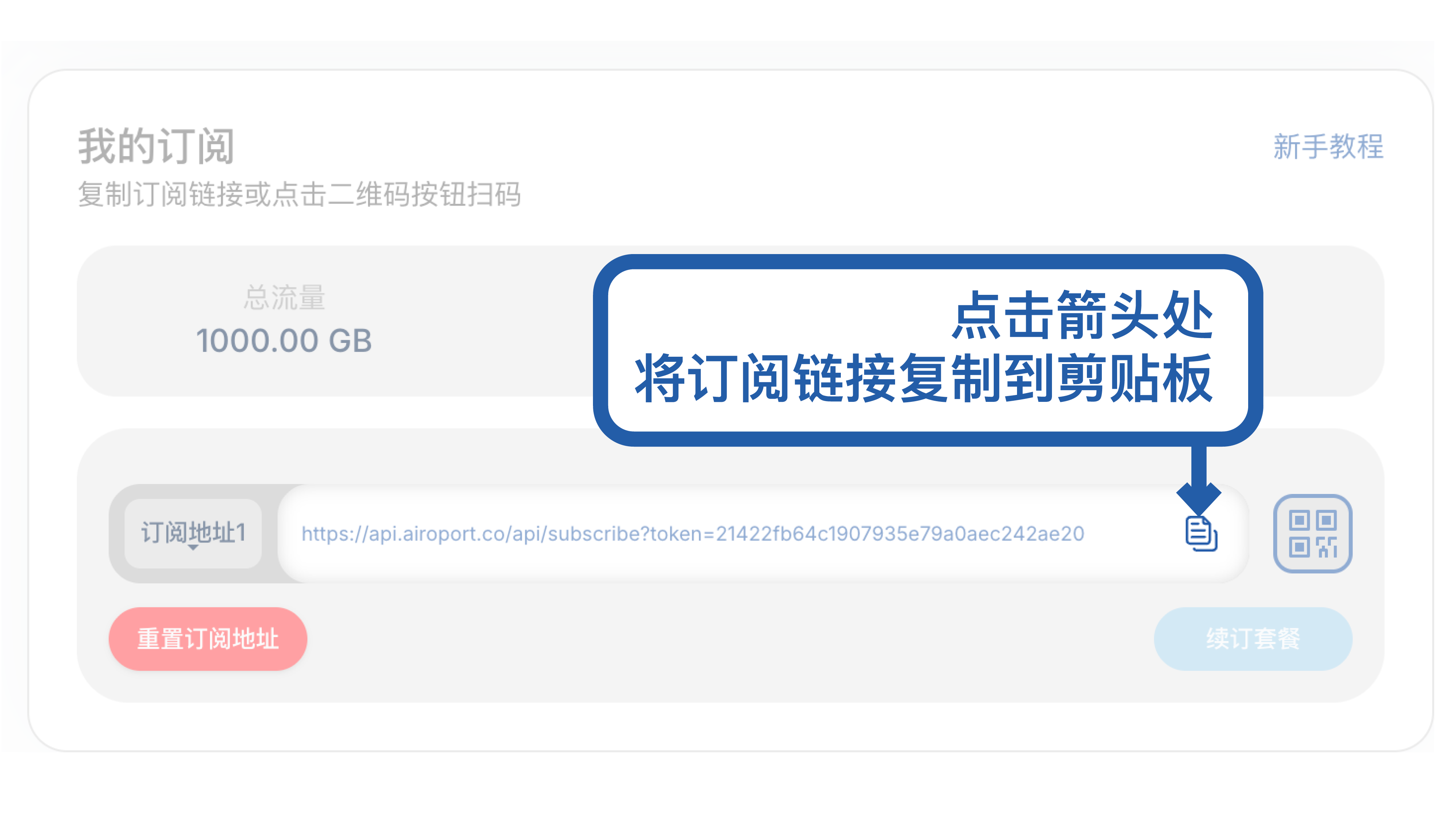
💡 First launch will request network permissions, please tap "Allow"
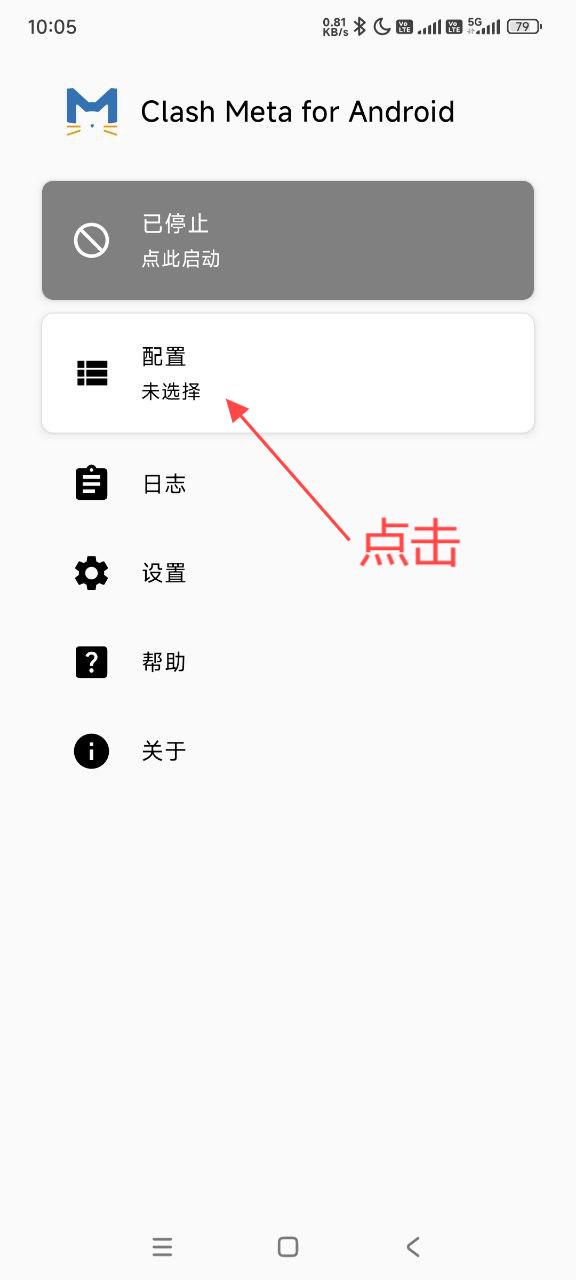
⚙️ Step 2: Configuration Management
Tap the "Configuration" tab to enter the configuration management page:
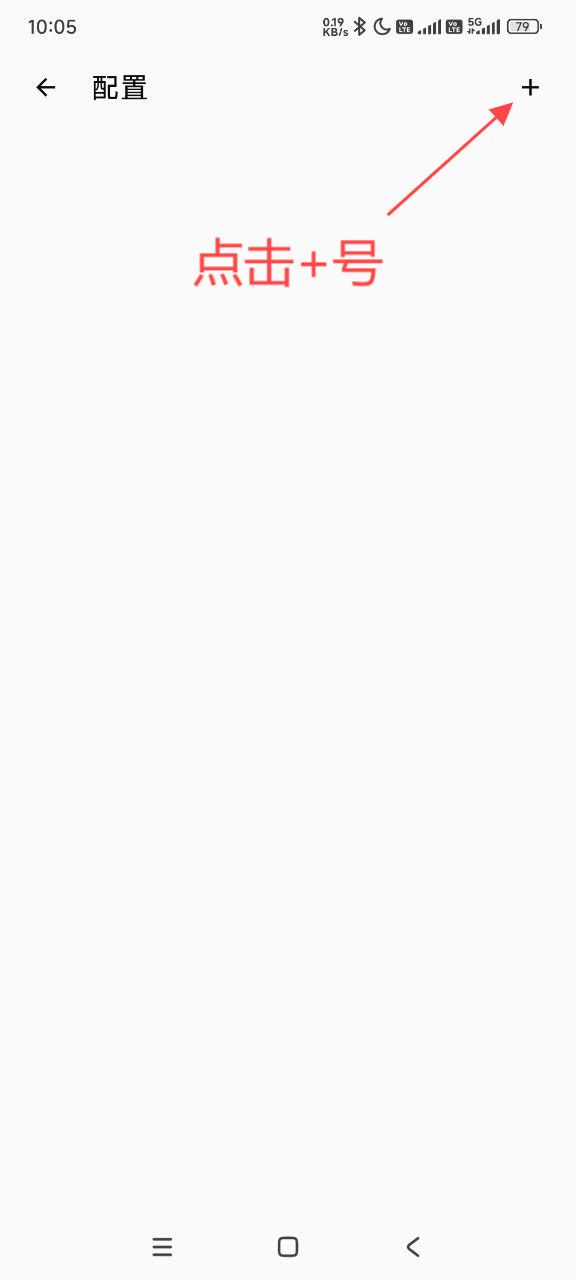
📥 Step 3: Import Configuration
Tap the "+" button in the top right corner and select import method:
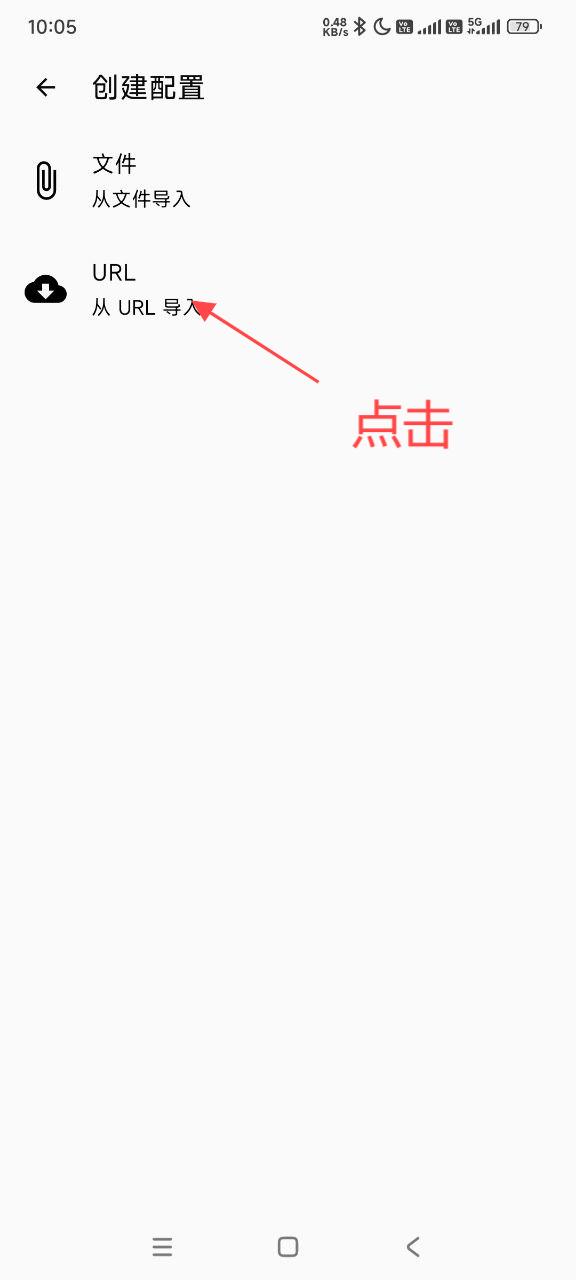
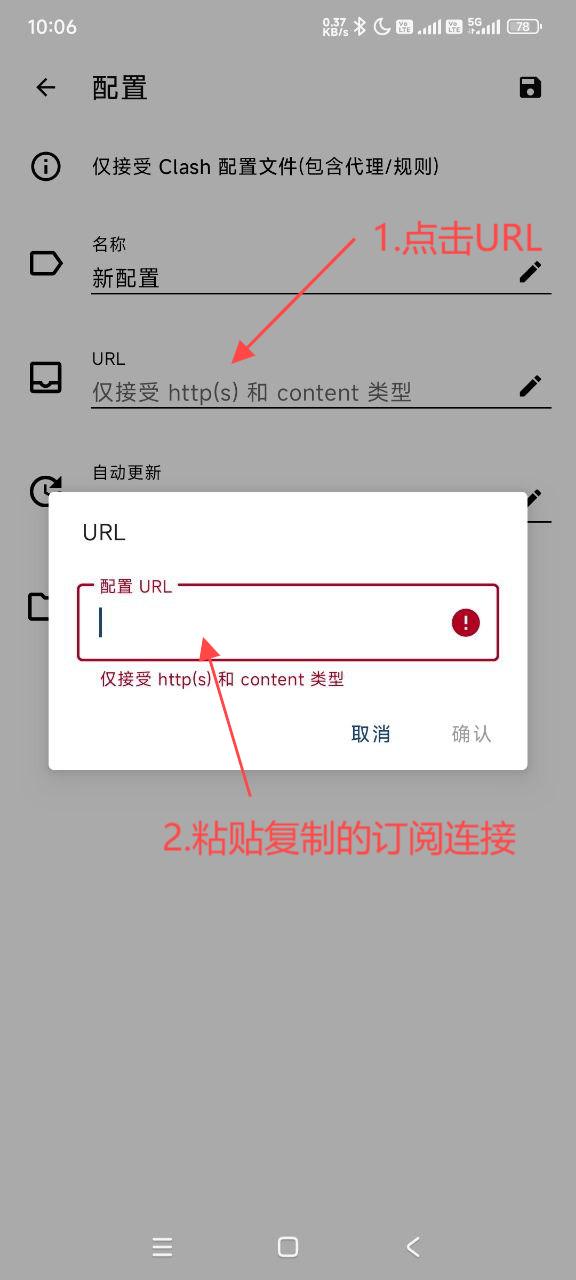
📝 Step 4: Configuration Information
Enter configuration information (subscription link or configuration file):
⏳ Step 5: Wait for Loading
After importing configuration, wait for node information to load completely:
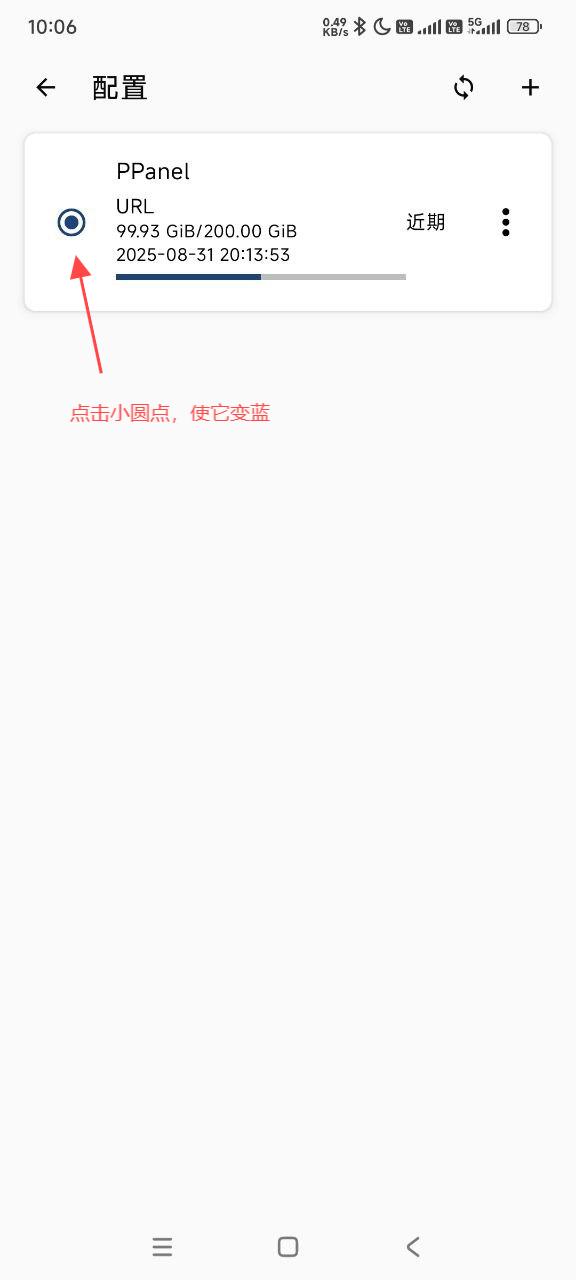
🌐 Step 6: Select Nodes
Choose appropriate servers from the node list:
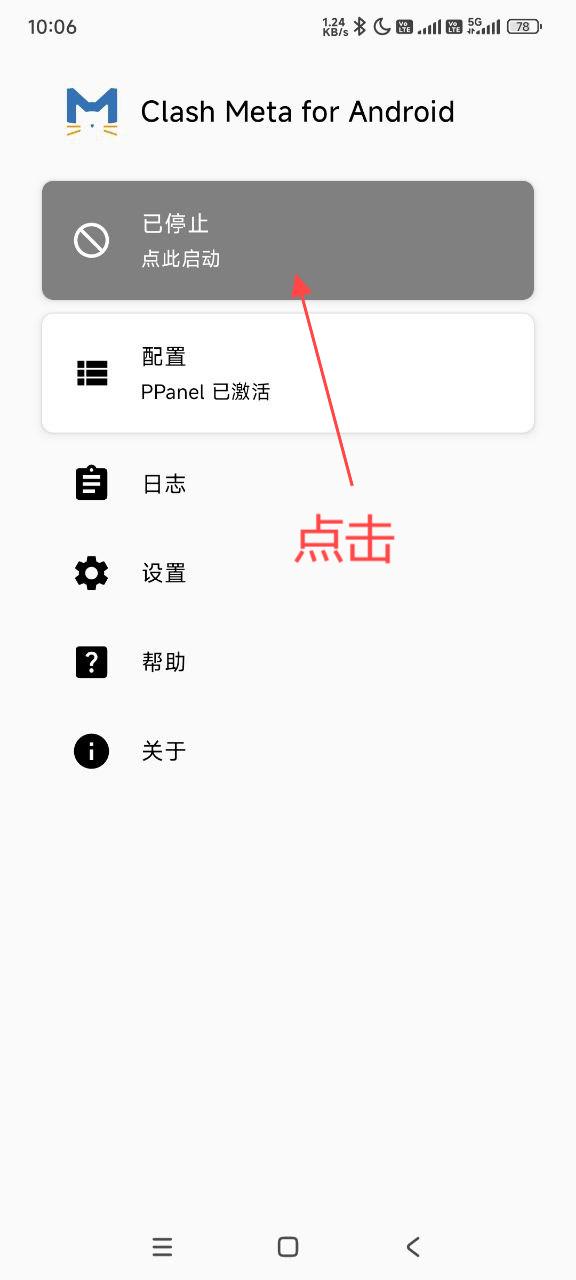
✅ Step 7: Confirm Configuration
Review configuration information and save after confirming it's correct:
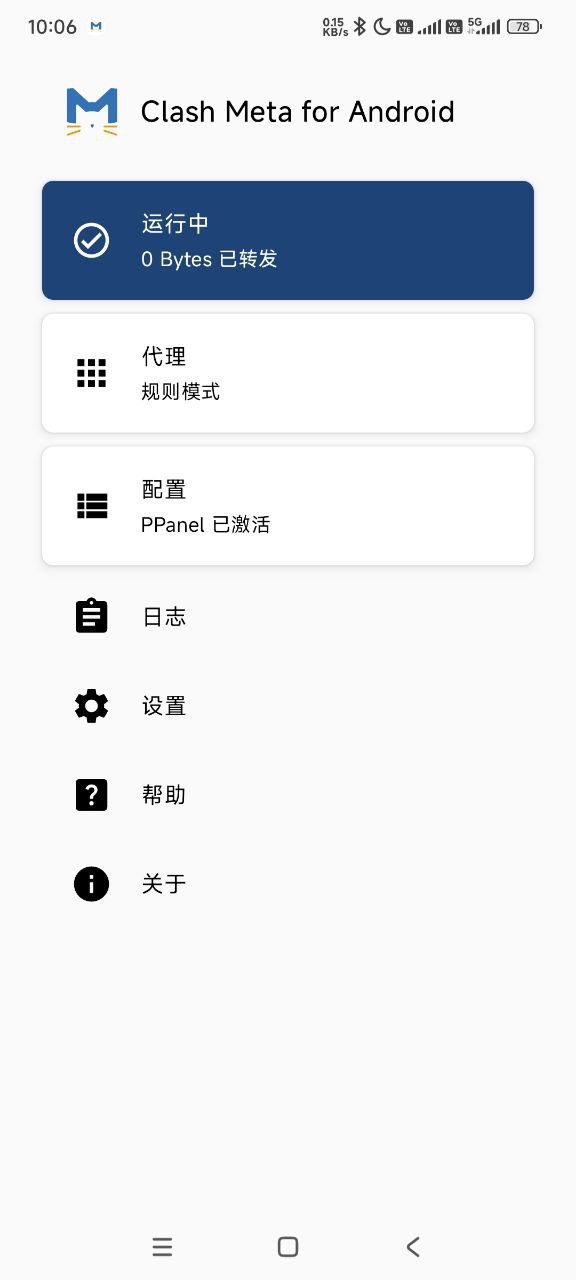
🚀 Step 8: Start Service
Return to the main interface and enable the proxy service:
🎛️ Advanced Features
📊 Rule Management
🎯 Traffic Routing Rules
- Domain Rules: Smart traffic splitting based on domain names
- IP Rules: Precise traffic routing based on IP addresses
- GeoIP Rules: Automatic routing based on geographical location
- Custom Rules: Support for user-defined routing rules
📋 Rule Configuration Examples
# Domain-based rules
rules:
  - DOMAIN-SUFFIX,google.com,PROXY
  - DOMAIN,www.google.com,PROXY
  - DOMAIN-KEYWORD,google,PROXY

# IP-based rules
  - IP-CIDR,192.168.0.0/16,DIRECT
  - IP-CIDR,10.0.0.0/8,DIRECT

# GeoIP rules
  - GEOIP,CN,DIRECT
  - GEOIP,US,PROXY

# Default rule
  - MATCH,PROXY
🔄 Policy Group Configuration
🎛️ Group Types
- Auto Select: Automatically choose the optimal node based on latency
- Load Balance: Evenly distribute traffic across multiple nodes
- Fallback: Automatically switch to backup nodes when primary fails
- Manual Select: User manually specifies which node to use
⚙️ Configuration Examples
proxy-groups:
  - name: "Auto"
    type: url-test
    proxies:
      - "Server1"
      - "Server2"
    url: 'http://www.gstatic.com/generate_204'
    interval: 300

  - name: "LoadBalance"
    type: load-balance
    proxies:
      - "Server1"
      - "Server2"
    url: 'http://www.gstatic.com/generate_204'
    interval: 300
📈 Monitoring & Statistics
📊 Real-time Monitoring
- Live Traffic: Display current upload/download speeds
- Connection Info: View active connection details
- Log Records: Detailed runtime log information
- Rule Matching: Show rule hit situations
📈 Performance Metrics
| Metric | Description | Update Frequency |
|---|---|---|
| 🚀 Speed | Current transfer rates | Real-time |
| 📊 Traffic | Total data consumed | Continuous |
| 🔗 Connections | Active connection count | Real-time |
| ⏱️ Latency | Response time to servers | Periodic |
🔧 Advanced Configuration
🌐 DNS Configuration
dns:
  enable: true
  listen: 0.0.0.0:53
  ipv6: false
  default-nameserver:
    - 223.5.5.5
    - 8.8.8.8
  enhanced-mode: fake-ip
  fake-ip-range: 198.18.0.1/16
  nameserver:
    - https://doh.pub/dns-query
    - https://dns.alidns.com/dns-query
🎯 Custom Rules
# Custom rule examples
rules:
  # Streaming services
  - DOMAIN-SUFFIX,netflix.com,Streaming
  - DOMAIN-SUFFIX,hulu.com,Streaming
  - DOMAIN-SUFFIX,disney.com,Streaming

  # Social media
  - DOMAIN-SUFFIX,twitter.com,Social
  - DOMAIN-SUFFIX,facebook.com,Social
  - DOMAIN-SUFFIX,instagram.com,Social

  # Gaming
  - DOMAIN-SUFFIX,steam.com,Gaming
  - DOMAIN-SUFFIX,epicgames.com,Gaming

  # Ad blocking
  - DOMAIN-SUFFIX,googleads.com,REJECT
  - DOMAIN-SUFFIX,doubleclick.net,REJECT
⚠️ Important Notes
🛡️ Security Reminders
- Configuration Sources: Only use trusted configuration providers
- Permission Management: Grant necessary permissions reasonably
- Regular Updates: Update to the latest version promptly
- Backup Configurations: Regularly backup important configuration files
🔧 Compatibility
- System Version: Ensure Android version meets requirements
- Hardware Architecture: Download the appropriate architecture package
- Network Environment: Some networks may restrict proxy functionality
❓ Frequently Asked Questions
🔧 Technical Support
Q: Unable to import configuration?
A: Please check:
- ✅ Subscription link is correct
- ✅ Network connection is normal
- ✅ Configuration format is compatible
- ✅ No firewall blocking access
Q: Connected but can't access internet?
A: Troubleshooting suggestions:
- 🔄 Check if nodes are available
- 📱 Confirm VPN permissions are granted
- 🌐 Try switching to different nodes
- 🛡️ Verify DNS settings
Q: App crashes or freezes?
A: Solutions:
- 🔄 Restart app or device
- 🗑️ Clear app cache and data
- 📊 Check system resource usage
- 📱 Update to latest version
🌐 Network Issues
Q: Slow connection speeds?
A: Optimization tips:
- 📍 Choose servers closer to your location
- ⏰ Test at different times of day
- 🔧 Try different protocols
- 📊 Use built-in speed test
Q: Frequent disconnections?
A: Stability improvements:
- 🔄 Enable auto-reconnect
- 🛡️ Check battery optimization settings
- 📶 Verify network stability
- ⚙️ Adjust keep-alive settings
⚙️ Configuration Issues
Q: Rules not working properly?
A: Check points:
- 📋 Verify rule syntax is correct
- 🎯 Check rule priority order
- 🔍 Review rule matching logs
- 🔄 Restart after rule changes
🎯 Performance Optimization
⚡ Speed Enhancement
🌍 Server Selection Strategy
- Geographic Proximity: Choose servers closest to your location
- Load Testing: Use built-in speed tests to compare servers
- Peak Hours: Avoid overcrowded servers during peak times
- Protocol Optimization: Test different protocols for best performance
🔧 Configuration Tuning
# Performance optimization settings
mixed-port: 7890
allow-lan: false
mode: rule
log-level: info
external-controller: 127.0.0.1:9090
🛡️ Stability Improvements
- Connection Redundancy: Configure multiple servers in groups
- Auto-failover: Enable automatic server switching
- Health Monitoring: Regular connectivity checks
- Backup Configurations: Maintain multiple config profiles
🔗 Learning Resources
📚 Official Documentation
🛠️ Technical Resources
🎓 Learning Materials
💡 Best Practices
🎯 Usage Recommendations
- Regular Updates: Keep the app updated for latest features and security patches
- Multiple Profiles: Maintain different profiles for different use cases
- Rule Optimization: Regularly review and optimize your routing rules
- Monitor Performance: Keep track of connection quality and speeds
🛡️ Security Guidelines
- Trusted Sources: Only use configurations from reputable providers
- Regular Audits: Periodically review your proxy rules and configurations
- Privacy Settings: Configure DNS and leak protection properly
- Log Management: Monitor logs for unusual activity
🎯 Summary & Evaluation
✅ Strengths
- 🆓 Free & Open Source: No cost with transparent development
- 🚀 High Performance: Efficient Clash Meta kernel
- 🎨 Modern Interface: Beautiful and intuitive Material Design
- 🔧 Rich Features: Comprehensive rule engine and customization options
- 🌐 Protocol Support: Extensive protocol compatibility
❌ Considerations
- 📚 Learning Curve: Advanced features require time to master
- 🔄 Alpha Status: May have stability issues as pre-release software
- 🛠️ Configuration Complexity: Can be overwhelming for beginners
- 📱 Resource Usage: May consume more battery and memory
🎯 Ideal For
- 🔧 Advanced Users: Those who want extensive customization
- 🆓 Budget-Conscious: Users seeking powerful free alternatives
- 🎓 Learning Enthusiasts: Those interested in networking concepts
- 🌐 Rule-Based Routing: Users needing complex traffic management
📅 Last Updated: July 10, 2025 | ⚔️ Compatible Version: Clash Meta for Android 2.11.6-alpha