
6.8 KiB
⚡ Clash Verge - Modern Cross-Platform Proxy Tool
🚀 Powerful Cross-Platform Proxy Client | Based on Clash core with modern GUI interface
Clash Verge is a modern GUI client based on the Clash core, supporting Windows, Linux, and macOS platforms. It features powerful routing rules and comprehensive proxy protocol support with an intuitive user interface.
📊 Platform Support
| Platform | Version Requirement | Architecture | Status |
|---|---|---|---|
| 🪟 Windows | Windows 7+ | x64 / x86 | ✅ Full Support |
| 🐧 Linux | Ubuntu 18.04+ | x64 / ARM64 | ✅ Full Support |
| 🍎 macOS | macOS 10.15+ | Intel / Apple Silicon | ✅ Full Support |
🔧 System Requirements
Windows Environment
| Item | Requirement | Recommended |
|---|---|---|
| Operating System | Windows 7+ | Windows 10/11 |
| Architecture | 32/64-bit | 64-bit |
| Device Type | PC / Tablet | Desktop |
| Memory | 2GB+ | 4GB+ |
| Storage | 100MB+ | 500MB+ |
📥 Official Downloads
💡 Download Tips: Recommend choosing the latest version for best experience and security
🌟 Main Download Sources
| Download Source | Type | Speed | Recommendation |
|---|---|---|---|
| 📦 Official GitHub | Official | ⭐⭐⭐ | ⭐⭐⭐⭐⭐ |
| 🚀 Mirror Accelerated | Mirror | ⭐⭐⭐⭐⭐ | ⭐⭐⭐⭐ |
| 🔗 Backup Link | Mirror | ⭐⭐⭐⭐ | ⭐⭐⭐ |
📋 Version Information
- Current Version: v1.7.7
- File Size: ~80MB
- File Type: Windows Installer (.exe)
- Digital Signature: ✅ Signed
⚠️ Security Notice
🛡️ Windows Security Settings
First launch may encounter security prompts
Windows 10/11 users may see Windows Defender SmartScreen security prompt on first launch:
🔧 Solution Steps
- Click "More info" - Expand detailed information
- Click "Run anyway" - Confirm running the application
- Add to whitelist - Avoid future prompts
💡 Security Note: This is normal security check for unknown publisher software. Clash Verge is open-source and secure.
🚀 Quick Configuration Tutorial
📥 Step 1: Import Configuration File
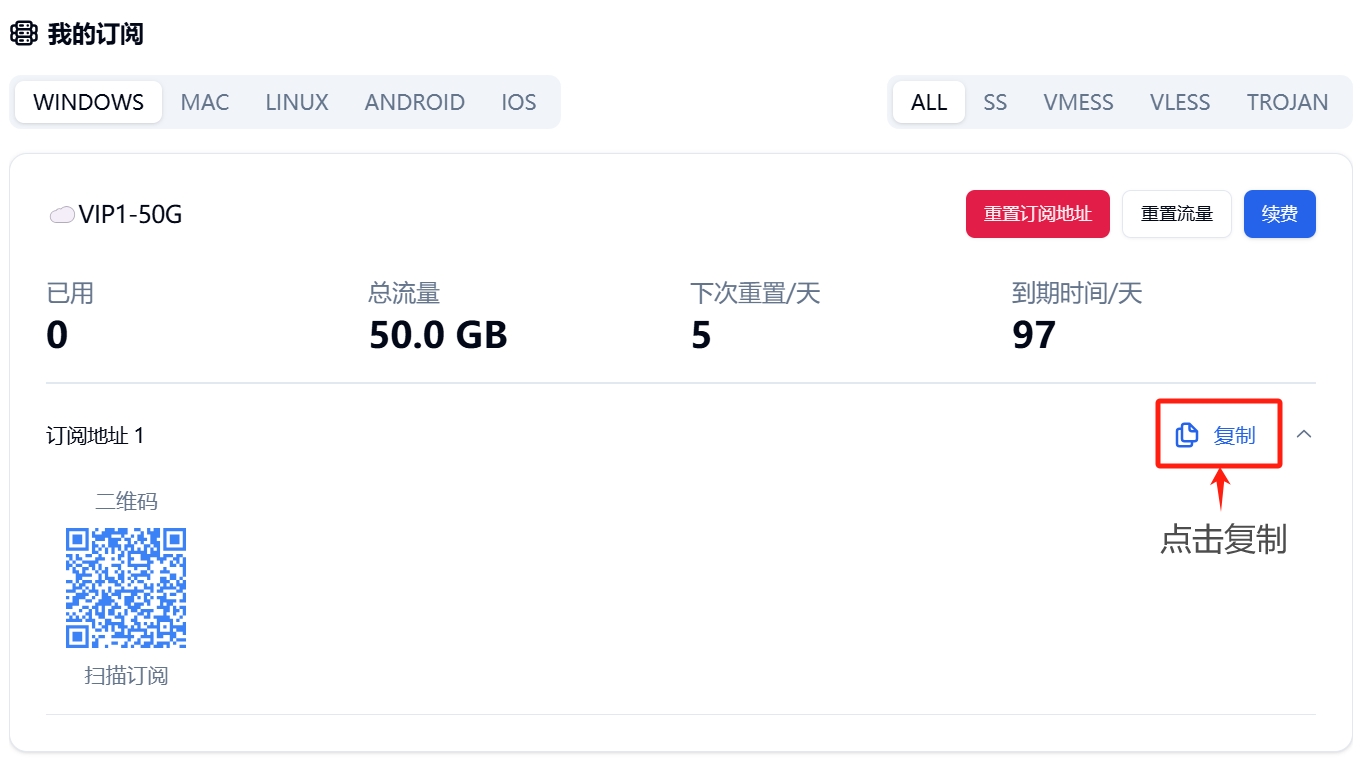
Import Method Selection: Supports URL subscription and local file import
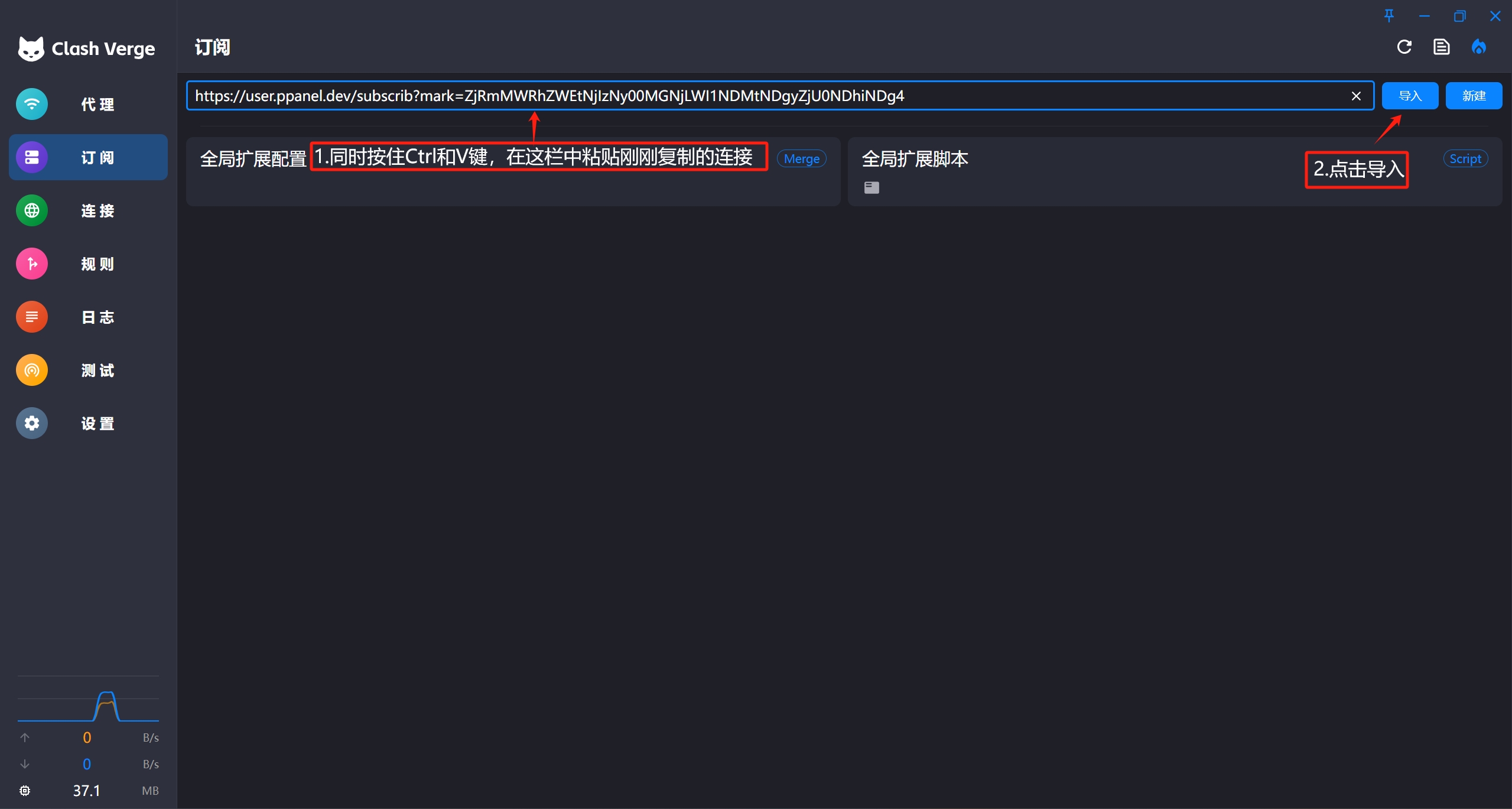
Parameter Configuration: Fill in subscription link or select configuration file
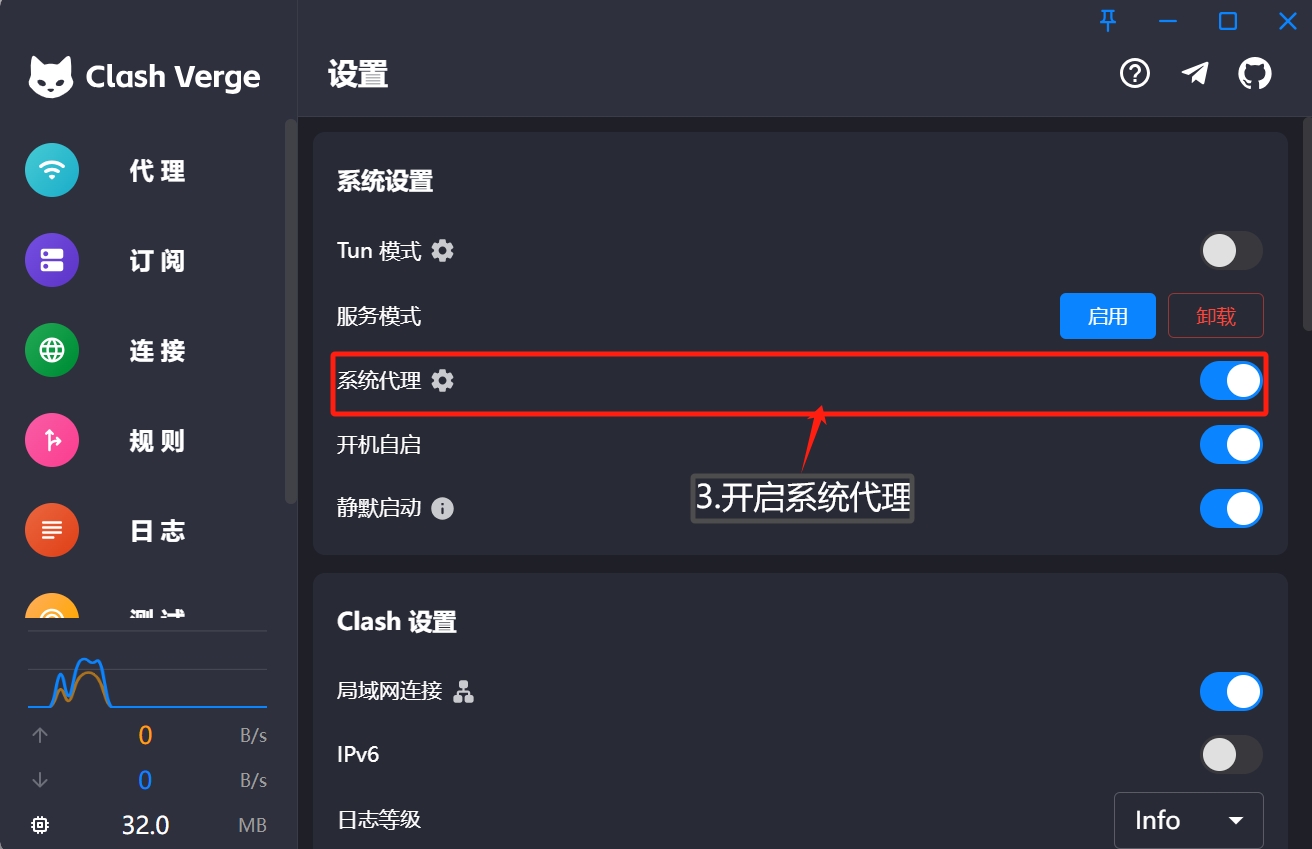
Configuration Verification: Check if configuration information is correct
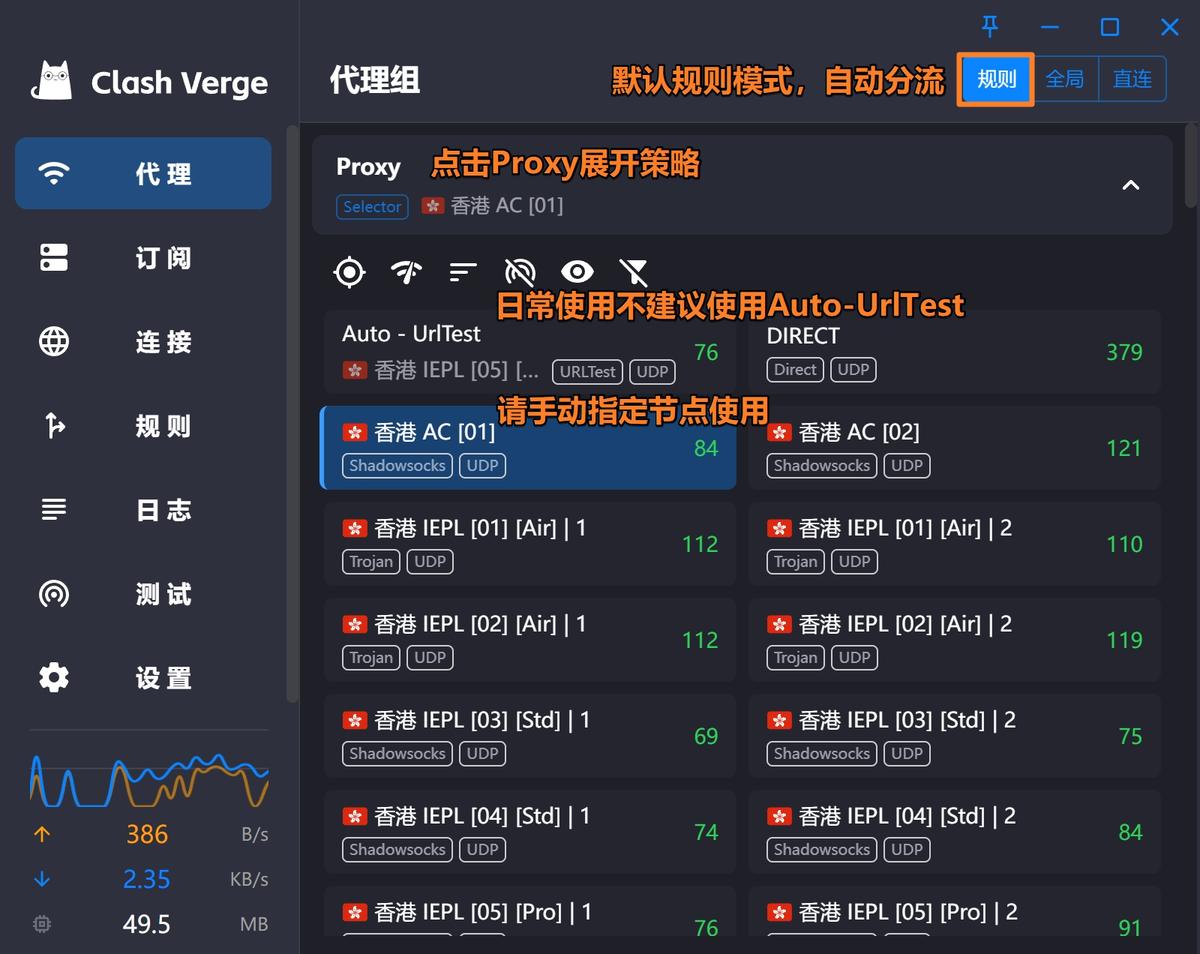
Activate Configuration: Apply configuration and enable proxy service
🔄 Step 2: Update Configuration File
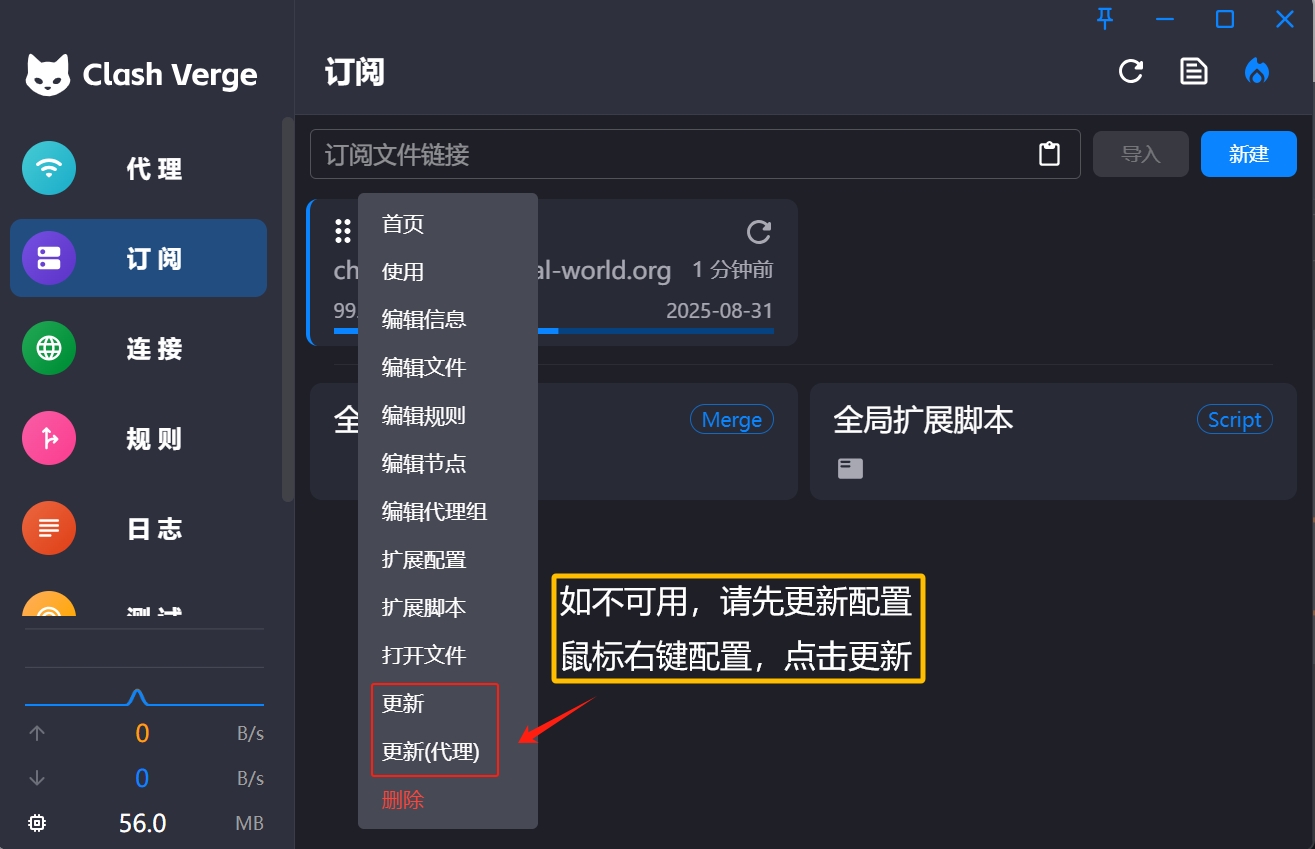
Automatic Update: Regularly update configuration to get latest node information
✨ Key Features
🎯 Core Functions
- 🚀 High-Performance Core: Based on Clash core, excellent performance
- 🎨 Modern Interface: Material Design style, simple operation
- 📊 Real-time Monitoring: Traffic statistics, connection monitoring, speed testing
- 🛡️ Rule Routing: Smart routing, custom rule support
🔧 Advanced Features
- ⚡ Policy Group Management: Flexible node grouping and switching
- 📈 Performance Optimization: Low memory usage, optimized CPU utilization
- 🌐 Multi-Protocol Support: Shadowsocks, V2Ray, Trojan, etc.
- 🔄 Auto Update: Automatic configuration file and rule updates
❓ Frequently Asked Questions
🔧 Installation Related
Q: Antivirus reports virus during installation?
A: This is a false positive. Clash Verge is open-source software. You can:
- Add to antivirus whitelist
- Temporarily disable real-time protection for installation
- Download from official GitHub to ensure file integrity
Q: Unable to start after installation?
A: Please check:
- System meets minimum requirements
- No conflicts with other proxy software
- Try running as administrator
- Re-download installation package
🌐 Usage Related
Q: How to import configuration?
A: Multiple import methods supported:
- URL Subscription: Directly paste subscription link
- Local File: Select local .yaml configuration file
- Clipboard Import: Import configuration directly from clipboard
Q: Configuration update fails?
A: Try these solutions:
- Check network connection is normal
- Verify subscription link is valid
- Try manual configuration update
- Re-import configuration file
🎨 Interface Preview
Main Interface Features
- 🎨 Material Design: Modern design language
- 🌙 Dark Theme: Eye-friendly dark mode
- 📊 Data Visualization: Intuitive traffic statistics charts
- ⚡ Quick Switch: One-click proxy mode and node switching
Function Modules
- 📊 Dashboard: Real-time status monitoring
- 🔧 Configuration: Configuration file management
- 📈 Connections: Connection details view
- ⚙️ Settings: Personalized setting options
🔄 Update Log
v1.7.7 (2024.11.16)
- ✨ Added: Support for more proxy protocols
- 🐛 Fixed: Configuration update exception issues
- ⚡ Optimized: Interface response speed improvement
- 🛡️ Enhanced: Security and stability improvements
🆚 Software Comparison
| Feature | Clash Verge | Other Clients | Advantage |
|---|---|---|---|
| Interface Design | ⭐⭐⭐⭐⭐ | ⭐⭐⭐ | Modern Material Design |
| Performance | ⭐⭐⭐⭐⭐ | ⭐⭐⭐⭐ | Efficient Rust implementation |
| Feature Richness | ⭐⭐⭐⭐⭐ | ⭐⭐⭐ | Complete Clash feature support |
| Update Frequency | ⭐⭐⭐⭐⭐ | ⭐⭐⭐ | Active development maintenance |
| Open Source Level | ⭐⭐⭐⭐⭐ | ⭐⭐⭐⭐ | Fully open source, transparent security |
📞 Get Help
- 🌐 Project Homepage: GitHub Repository
- 📋 Issue Reporting: Issues Page
- 💬 Community Discussion: Discussions Forum
- 📚 Documentation: Wiki Documentation
📅 Last Updated: July 10, 2025 | ⚡ Compatible Version: Clash Verge v1.7.7+